
How to Use AI Tools in 2026: 9 Simple Steps for Beginners

How to Use AI Tools

Most beginners do not fail with AI because the tools are too hard. They fail because they try to use too many tools at once.

One day they test ChatGPT. The next day they open Canva. Then they hear about Pictory, Runway, Zapier, Make, SurferSEO, Frase, Claude, Gemini and ten more apps. After a week, they have many accounts but no clear workflow.

That is not a beginner problem. That is a system problem.

If you want to learn how to use AI tools in 2026, the first thing to understand is simple: AI is no longer only for technical people. Bloggers, creators, freelancers, students, small business owners and affiliate marketers now use AI tools every day to write faster, design better visuals, create videos, research topics, automate tasks and build online income systems.

But you do not need every AI tool. You need one clear goal, a small beginner stack and a repeatable workflow.

 

How to Use AI Tools


This guide will show you how to use AI tools in a practical way, even if you have zero technical experience. We will focus on the use cases that matter most for AI Sage Labs readers: blogging, content creation, design, video, SEO, automation, affiliate marketing and online business.

How to Use AI Tools Without Getting Overwhelmed

The best way to start with AI tools is to pick one clear goal first.

Do not begin by asking, “What is the best AI tool?”

Begin by asking, “What do I want AI to help me do this week?”

For most beginners, the answer is usually one of these:

  • Write blog posts faster
  • Create social media content
  • Design thumbnails or featured images
  • Edit videos
  • Research keywords
  • Automate repetitive tasks
  • Build a blog or online business

Once you know the task, choosing the tool becomes easier.

A beginner does not need a giant AI stack on day one. Start with one writing tool and one design tool. Add video, SEO and automation tools only when you have a real workflow that needs them.

Task Beginner Tool Type Example Tools
Writing and ideas AI writing assistant ChatGPT, Claude, Writesonic
Blog visuals AI design tool Canva AI
Video repurposing AI video tool InVideo AI, Pictory, Runway, Synthesia
Grammar and polish AI editing tool Grammarly
Automation Workflow automation tool Zapier, Make
SEO improvement AI SEO tool Rank Math, SurferSEO, Frase, NeuronWriter


Simple rule: one goal, one tool, one workflow.

What Are AI Tools?

AI tools are software applications that use artificial intelligence to help you complete tasks faster, better, or more automatically.

They can help with writing, editing, design, research, data analysis, video creation, audio editing, image generation, customer support, coding and workflow automation.

For beginners, the easiest way to understand AI tools is this:

AI tools take your instruction and produce an output.

Your instruction is called a prompt. The output could be a blog outline, article draft, image idea, video script, email, table, summary, social caption or workflow plan.

For example, you can write:

Write a beginner-friendly blog outline about AI tools for bloggers in 2026.

The AI tool may give you an organized article structure with headings, subheadings and key talking points.

That is the basic pattern. You give direction. AI gives a draft or suggestion. You review, improve and publish the final version.

The most important thing to understand is that AI tools are assistants, not replacements for your judgment. They can speed up the work, but you still need to decide what is accurate, useful and right for your audience.

Common Types of AI Tools Beginners Should Know

Before you learn how to use AI tools, it helps to understand the main categories. You do not need every category right away, but knowing the difference will save you from wasting time and money.

AI Writing Tools

AI writing tools help you create outlines, introductions, blog posts, emails, product descriptions, YouTube scripts, newsletters and social media captions.

For bloggers, this is usually the first category to learn because writing touches almost every online business workflow.

The best use case is turning ideas into structured drafts faster. The real limitation is that AI writing still needs editing, fact-checking, examples and human experience.

AI Design Tools

AI design tools help you create graphics, thumbnails, featured images, social media posts, Pinterest pins, logos and visual templates.

For bloggers, visuals matter because they affect trust, click-through rate and social sharing.

Canva AI is the easiest starting point for many beginners because it combines templates, text, images, and AI features in one simple design workspace.

AI Video Tools

AI video tools help you turn written content into videos, generate captions, edit footage, create voiceovers or produce short clips for social platforms.

For bloggers, this creates a strong repurposing opportunity. One blog post can become a YouTube video, a short Instagram Reel, a TikTok clip, a Pinterest idea pin or a LinkedIn video summary.

Examples include InVideo AI, Pictory, Runway and Synthesia.

AI Automation Tools

AI automation tools connect different apps and make tasks happen automatically.

For example:

New blog post published → create social media task → update Google Sheet → add task to content calendar.

Tools like Zapier and Make are useful because they save time on repetitive work.

If automation is new for you, this guide on what AI automation tools are explains the basics in a simple way.

AI SEO Tools

AI SEO tools help you plan and improve content for search engines.

They can help with keyword research, content briefs, heading suggestions, related terms, internal linking and on-page optimization.

For bloggers, SEO is where AI becomes more valuable because ranking content can generate traffic for months or years.

The limitation is that SEO tools give recommendations, but they cannot replace real expertise, helpful content, original examples and reader trust.

Why Beginners Should Use AI Tools in 2026

AI is no longer optional for online creators.

That does not mean every piece of content should be generated by AI. It means every serious blogger should understand how AI fits into the workflow.

The biggest benefit is speed.

A beginner who used to spend three hours brainstorming blog ideas can now create a draft topic map in minutes. A blogger who struggled with featured images can create a professional-looking design in Canva. A creator who avoided video can turn articles into short video drafts with AI video tools.

But the real benefit is not only speed. The real benefit is consistency.

Most blogs fail because the owner stops publishing. AI tools make it easier to keep going because they reduce friction at every step.

If you can create outlines faster, write first drafts faster, design thumbnails faster and repurpose content faster, your chances of staying consistent improve.

That is where AI becomes valuable for bloggers.

Step 1: Pick One Clear Goal

The first step in learning how to use AI tools is choosing one goal.

This is where most beginners make the first mistake. They start with tools instead of outcomes.

Do not ask, “Which AI tool should I use?”

Ask, “What do I want AI to help me achieve this week?

Good beginner goals include writing one blog post, creating five Pinterest pins, turning one blog post into a YouTube script, building a list of blog topic ideas, creating a content calendar, improving an old article, automating social sharing, or writing better email subject lines.

Once the goal is clear, the right tool becomes easier to choose.

If your goal is writing a blog post, start with ChatGPT, Claude, or Writesonic. If your goal is creating visuals, start with Canva AI. If your goal is turning articles into videos, start with InVideo AI or Pictory. If your goal is saving time on repetitive tasks, start with Zapier or Make.

Step 2: Start With a Beginner AI Stack

Do not try 15 tools in your first week.

That creates confusion, subscription waste, and half-finished workflows.

Start with a small beginner stack that covers the basics.

Writing: ChatGPT, Claude or Writesonic

Use an AI writing assistant for idea generation, outlines, drafts, FAQs, intros, meta descriptions and social captions.

Create a beginner-friendly blog outline for a 3000-word article about [topic]. Include SEO headings, FAQs and a practical conclusion.

Design: Canva AI

Use Canva AI for blog featured images, Pinterest pins, Instagram posts, YouTube thumbnails, and simple brand graphics.

Create a blog featured image concept for an article titled [title]. Use a clean tech-blog style with AI icons and readable headline text.

Editing: Grammarly

Use Grammarly or another editing tool to improve clarity, grammar and tone before publishing.

A simple workflow is:

Draft with AI → edit manually → polish with Grammarly → publish.

Automation: Zapier or Make

Use automation only after you already have a repeatable task.

A beginner workflow could be:

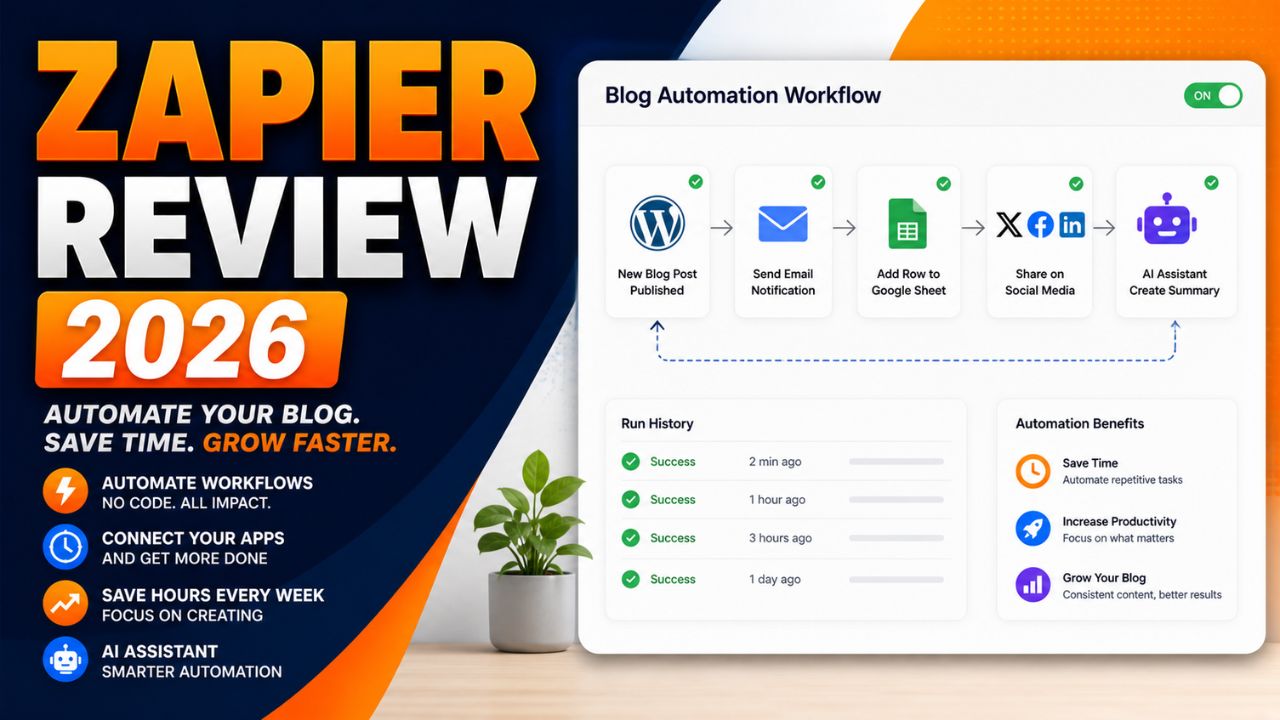
New WordPress post → add row to Google Sheet → create social media task → notify yourself by email.

Blogging Foundation: WordPress and Hosting

If you want to turn AI tools into a real online business, you need somewhere to publish. A WordPress blog on reliable hosting is still one of the best foundations for SEO and affiliate marketing.

For beginners, Hostinger is a practical starting point because it is WordPress-friendly and easy to set up.

Build Your AI Blog Foundation

If you want to use AI tools for blogging, affiliate reviews, or online income, start with a real WordPress site where your content can rank and convert.

Start your AI blog with Hostinger

Step 3: Learn Prompting

Prompting is the most important beginner AI skill.

A prompt is simply the instruction you give to an AI tool.

Bad prompts produce weak results. Clear prompts produce useful drafts.

The easiest prompt formula is:

Task + Context + Format + Tone

Here is what that means:

  • Task: What do you want the AI to do?
  • Context: Who is it for and why?
  • Format: What should the output look like?
  • Tone: How should it sound?

Bad prompt:

Write about AI tools.

Better prompt:

Write a 300-word beginner-friendly introduction for a blog post about how AI tools help bloggers in 2026. Use simple English, short paragraphs, and a practical tone.

Even better prompt:

Write a 300-word introduction for AI Sage Labs readers. The audience is beginner bloggers and creators who feel overwhelmed by AI tools. Explain the problem, promise a step-by-step solution, and avoid hype.

The better prompt gives the AI a role, audience, purpose, structure, and style. That is why the output will usually be stronger.

Step 4: Create Your First Blog Outline

The safest way to use AI tools for blogging is to begin with outlines.

Do not ask AI to write a full article immediately. Start by asking it to organize your ideas.

Create a detailed SEO outline for a 3000-word blog post titled “How to Use AI Tools in 2026.” The audience is beginner bloggers and creators. Include step-by-step guidance, tool examples, common mistakes, FAQs, and a final checklist.

Then review the outline yourself.

Ask these questions:

  • Does this answer the reader’s real problem?
  • Are the headings clear?
  • Is anything missing?
  • Is the order logical?
  • Can I add personal examples or tool experience?

This is where human judgment matters. AI can organize quickly, but you decide what belongs in the final post.

If you want tool ideas for your stack, read this guide on trending AI tools in 2026.

Step 5: Turn the Outline Into a Draft

Once you have a strong outline, write section by section.

This is important because long AI outputs often become repetitive, generic, or shallow.

Instead of asking for one long article, use a section-by-section workflow.

Write the section “Step 3: Learn Prompting” for this blog post. Keep it beginner-friendly, practical, and around 350 words. Include one bad prompt, one better prompt, and one improved prompt.

This gives you better control.

After each section, edit manually. Add examples, remove weak sentences, and check accuracy.

AI should help you create a first draft, not replace the editing process.

The best AI-assisted blog posts usually follow this workflow:

Outline → section draft → manual edit → SEO check → final polish → publish.

Step 6: Use AI for Blog Images and Graphics

Images make your blog feel more professional.

For AI blogs, you should create at least one featured image for every post. You can also create simple comparison graphics, workflow diagrams, and Pinterest pins.

Good blog visuals can help with click-through rate, social sharing, brand trust, Pinterest traffic, and reader engagement.

A beginner visual workflow looks like this:

  1. Write your blog title.
  2. Ask AI for a featured image concept.
  3. Create the image in Canva AI or another design tool.
  4. Add your brand colors and title overlay.
  5. Compress the image before uploading to WordPress.

You do not need perfect design skills. You need clean, readable visuals that match the article and help the reader understand the topic.

Step 7: Use AI for Video Creation

Video is one of the easiest ways to repurpose blog content in 2026.

If you already wrote a blog post, you have the raw material for a video.

You can ask AI to turn your article into a YouTube script, short video script, list of talking points, voiceover script, storyboard, or social media video caption.

Turn this blog post section into a 60-second YouTube Shorts script. Keep it beginner-friendly, include a strong hook, and end with a simple call to action.

Tools like InVideo AI and Pictory can help turn written content into video drafts with visuals, captions, and voiceover.

This is useful because it helps bloggers reach audiences beyond Google Search.

One article can become several content assets:

  • Blog post for SEO
  • YouTube video for discovery
  • Short clip for Instagram or TikTok
  • Pinterest pin for visual traffic
  • LinkedIn post for authority

That is how AI tools multiply the value of one piece of content.

Step 8: Automate the Repetitive Parts

Automation is powerful, but beginners should use it carefully.

Do not automate before you understand the task manually. First, repeat the task a few times. Then automate the parts that are boring and predictable.

Good beginner automations include saving new blog post ideas into Google Sheets, creating social media tasks after publishing, tracking affiliate content updates, sending reminders, or organizing lead information.

Example workflow:

New WordPress post published → add post title and URL to Google Sheets → create task to make Pinterest pins → send reminder to create social captions.

This kind of automation does not replace strategy. It removes repetitive admin work.

Need Help With AI Automation?

If you do not want to set up workflows yourself, you can hire help for WordPress, Zapier, Make, AI automation, or content systems.

Find AI automation and WordPress experts on Fiverr

Step 9: Combine AI Tools Into a Blogging System

The real power of AI tools comes when you combine them into a simple system.

Here is a beginner AI blogging workflow:

  1. Use ChatGPT, Claude or Writesonic to brainstorm topics.
  2. Use an SEO tool to choose one target keyword.
  3. Use AI to create a blog outline.
  4. Write the draft section by section.
  5. Edit manually and polish with Grammarly.
  6. Create a featured image in Canva AI.
  7. Publish on WordPress.
  8. Use AI to create social posts from the article.
  9. Use Zapier or Make to track and distribute the content.
  10. Update the article after 60 to 90 days based on performance.

This workflow is simple, but it covers the full content cycle.

Most beginners fail because they use AI randomly. They ask for one caption, one outline or one idea, then move on.

A system is different. A system helps you repeat the process every week.

That is how AI tools become useful for blogging and online business.

Best Beginner AI Workflow for Bloggers

If you are not sure where to begin, use this simple workflow for your first few posts.

Stage Tool Type Beginner Action
Idea AI writing assistant Generate 10 topic ideas
SEO Keyword or SEO tool Pick one target keyword
Outline AI writing assistant Create article structure
Draft AI writing assistant Write section by section
Edit Manual editing or Grammarly Improve clarity and accuracy
Visual Canva AI Create featured image
Publish WordPress Add post, links, and images
Promote AI and automation Create captions and tasks
Track Search Console or spreadsheet Review performance


If you are just starting, use this workflow for one post per week. Once it feels easy, increase publishing frequency.

Common Mistakes Beginners Make With AI Tools

Using Too Many Tools

More tools do not automatically mean better results.

Start with one writing tool, one design tool, and one editing tool. Add more only when you feel a real bottleneck.

Copying AI Content Without Editing

AI drafts often sound clear but generic.

Always edit before publishing. Add examples, opinions, screenshots, comparisons, and real experience wherever possible.

Ignoring SEO

AI can write content quickly, but fast content without search intent does not automatically get traffic.

Before writing, understand the keyword, reader problem, and competing pages.

Trusting AI Facts Without Checking

AI can make mistakes. It can also give outdated pricing, wrong feature lists, or invented statistics.

Always verify pricing, tool features, and important claims from official sources before publishing.

Automating Too Early

Automation works best when the workflow is already clear.

If you automate a messy process, you create faster confusion.

How to Use AI Tools for Online Income

AI tools can support online income, but they do not create income by themselves.

This is important.

You do not make money because you opened an AI tool. You make money when AI helps you support a real business model.

For bloggers and affiliate marketers, AI tools can help you create review posts, comparison articles, tutorials, email content, social posts, video scripts, digital product ideas and content updates.

For freelancers, AI tools can help with proposals, client research, service delivery, design drafts, content writing, SEO reports and workflow automation.

For creators, AI tools can help repurpose one idea into multiple formats.

The income comes from the system around the tool: audience, content, offer, trust, traffic and consistency.

Recommended AI Tools to Start With

If you want to test tools without overthinking, start with a small stack.

Try a Simple Beginner AI Stack

Start with one writing tool, one design tool, and one automation tool. Once your workflow is working, add video and SEO tools only when needed.

Try ChatGPT for writing and planning

Try Canva for blog visuals

Try Zapier for simple automation

Recommended Resource Before You Finish

Want a Faster AI Tools Starter Path?

If you feel overwhelmed by too many AI tools, start with a simple checklist instead of buying random subscriptions. Your first goal should be one blog post, one featured image, one social caption and one basic automation.

Access the AI Tools Beginner Starter Checklist

Recommended Book for AI Beginners

If you want to understand the business side of using AI and digital tools, a useful book to explore is Co-Intelligence: Living and Working with AI. It is a helpful read for understanding how AI can fit into real work instead of treating it like a shortcut.

Learn Practical AI Thinking

If you want to understand how to work better with AI tools, this book is a strong next step for bloggers, creators and online business owners.

Check Co-Intelligence on Amazon

The Honest Truth About AI Tools for Beginners

AI tools can save time, but they do not remove the need to think.

This is the biggest truth beginners need to understand.

AI can help you write faster. It can suggest ideas. It can create images. It can turn articles into videos. It can automate repetitive tasks.

But it cannot decide your real audience for you. It cannot build trust automatically. It cannot replace personal experience. It cannot guarantee traffic or income just because you publish more content.

The bloggers who win with AI in 2026 are not the ones blindly copy-pasting AI articles.

They are the ones using AI to do more of the right work: better research, better outlines, faster drafts, cleaner visuals, more consistent publishing, smarter repurposing, and stronger updates.

AI is not the business. AI is the productivity layer on top of the business.

If you use it that way, it becomes extremely powerful.

Final Beginner Checklist

Before you start using AI tools seriously, follow this checklist:

  • Pick one clear goal.
  • Choose one writing tool.
  • Choose one design tool.
  • Learn the basic prompt formula.
  • Create one blog outline.
  • Draft one post section by section.
  • Edit manually before publishing.
  • Create one featured image.
  • Publish on WordPress.
  • Repurpose the post into social content.
  • Track what works.

Do not make the process complicated.

One finished post is more valuable than ten unfinished tool experiments.

Final Words:

Yes, beginners should absolutely learn how to use AI tools in 2026.

AI tools can help you save time, create better content, design visuals, repurpose posts, automate workflows and build a stronger online business foundation.

But the smartest approach is simple: start small.

Pick one goal. Choose one or two tools. Learn prompting. Create your first workflow. Improve it over time.

If your goal is blogging, the best beginner path is:

WordPress blog → AI writing tool → Canva AI → Grammarly → SEO basics → automation later.

That is enough to begin.

Once your workflow is working, you can add advanced tools like SurferSEO, Zapier, Make, Pictory and InVideo AI.

The goal is not to collect AI tools. The goal is to build a system that helps you create useful content consistently.

That is how beginners turn AI from a confusing trend into a practical advantage.

Frequently Asked Questions

Are AI tools free to use?

Many AI tools offer free plans, but advanced features usually require paid plans. Beginners can start with free versions of writing, design and editing tools, then upgrade only when a limitation slows down their workflow.

Do I need coding skills to use AI tools?

No. Most beginner AI tools do not require coding skills. Writing tools, design tools, video tools and automation platforms are built for regular users. Coding knowledge can help with advanced workflows, but it is not required to start.

Which AI tool should I start with?

Start with an AI writing assistant because writing and planning are useful in almost every workflow. After that, add Canva AI for visuals and Grammarly for editing. Bloggers can later add SEO, video and automation tools.

Can AI tools replace human writers?

AI tools can assist writers, but they should not replace human judgment. The best content still needs real experience, editing, examples, fact-checking and a clear understanding of the reader.

Are AI tools good for blogging?

Yes. AI tools are useful for blogging when used properly. They can help with topic ideas, outlines, drafts, editing, images, SEO, social captions and content repurposing. The key is to use AI as an assistant, not as a copy-paste content machine.

How long does it take to learn AI tools?

Basic AI tool usage can be learned in a few days. Building a complete workflow for blogging, design, video and automation may take a few weeks of practice. The fastest way to learn is to use AI on one real project from start to finish.

Can I make money with AI tools?

Yes, but not just by using AI tools randomly. AI tools can help you create content faster, build affiliate blogs, design digital products, automate services and repurpose content. Income comes from a real business model, not the tool itself.

Conclusion

Learning how to use AI tools is one of the most useful skills a beginner can build in 2026.

You do not need to become technical. You do not need to subscribe to every tool. You do not need to automate your entire business in one week.

Start with one problem. Choose one tool. Create one workflow. Finish one real project.

That is how AI becomes useful.

For bloggers, the goal is not to publish more generic content. The goal is to create helpful articles faster, design better visuals, repurpose content smarter, and stay consistent long enough for your work to compound.

Use AI as a helper, not a shortcut. Keep the strategy human. Keep the editing human. Keep the final judgment human.

That is the best way to use AI tools without losing quality, trust, or direction.

How We Checked This Guide

Before updating this guide, we checked Google’s publishing guidance for helpful AI-assisted content and Google’s beginner AI learning resource. This helps keep the article practical, safe, and useful for readers who are learning how to use AI tools for real work.

Affiliate Disclosure

As an Amazon Associate, I earn from qualifying purchases. Some links in this article are affiliate links, which means I may earn a commission at no extra cost to you if you buy through them. I only recommend tools, books and services that may help beginners build better blogs, create useful content, or grow their online work more effectively.
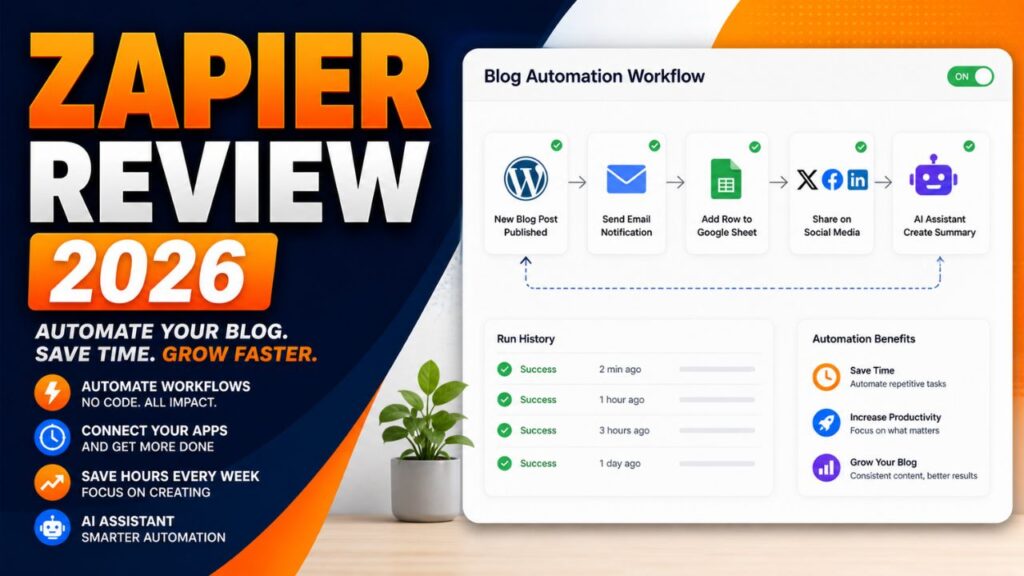
Zapier Review 2026: Is It Still the Easiest Automation Tool for Bloggers?

Zapier Review 2026

Zapier is still one of the first names people hear when they start learning automation.

That is not an accident. For years, Zapier has made it possible for non-technical users to connect apps, move data, create reminders, and automate repetitive work without writing code.

But automation in 2026 is not the same as it was a few years ago.

Make.com is more visual. Pabbly Connect is popular with budget users. n8n gives technical users more control. AI agents and automation assistants are changing how workflows are built. Even Zapier itself is evolving with Copilot, Tables, Forms, Interfaces, MCP and AI orchestration features.

So the real question is simple: is Zapier still the easiest automation tool for bloggers?


Zapier Review 2026


That is exactly what this Zapier review 2026 will answer. If you are a blogger, affiliate marketer, creator, freelancer or beginner trying to automate online tasks, this guide will help you decide whether Zapier is still worth using for your workflow.

Zapier Review 2026: What Is Zapier?

Zapier is a no-code automation platform that connects different apps and automates workflows between them.

In simple words, Zapier helps your apps talk to each other.

For example, instead of manually copying a new blog post link, adding it to a spreadsheet, creating a social media task and sending yourself a reminder, Zapier can automate parts of that workflow.

Zapier workflows are called Zaps.

A basic Zap usually has:

  • Trigger: the event that starts the workflow
  • Action: what Zapier does after the trigger

Example:

New WordPress post published → add post title and URL to Google Sheets → send email reminder → create social media task.

That is the main reason Zapier has stayed popular. It makes automation easier for people who do not want to code.

Why Zapier Still Matters in 2026

Zapier still matters because it is simple, mature, and widely supported.

Zapier’s official pricing and app pages highlight thousands of integrations, and the platform is now more than simple Zaps. Current Zapier plans include automation tools such as Zaps, Tables and Forms or Interfaces depending on the account and plan page wording. Zapier also highlights AI-focused features such as Copilot and MCP.

For bloggers, this matters because your workflow may include WordPress, Gmail, Google Sheets, ConvertKit, Mailchimp, Notion, Airtable, Slack, social platforms, forms, CRMs, payment tools and AI apps.

The more apps Zapier supports, the easier it is to connect your blogging system.

The other reason Zapier matters is that it is beginner-friendly. Many automation tools are powerful, but not all are easy to understand on day one.

Zapier’s biggest strength is that it makes automation feel approachable.

That is why this Zapier review 2026 focuses on beginner blogging workflows instead of only listing technical automation features.

How Zapier Works

Zapier works through workflows called Zaps.

The basic process looks like this:

  1. Choose a trigger app.
  2. Select the event that starts the workflow.
  3. Choose one or more action apps.
  4. Map the data from the trigger to the actions.
  5. Test the workflow.
  6. Turn the Zap on.

For example, a blogger might create this Zap:

New WordPress post → create a row in Google Sheets → send an email notification → create a Trello task.

This kind of workflow is useful because it keeps blog operations organized without copying and pasting everything manually.

Zapier also includes AI features that can help users build and manage automations. Zapier’s help center describes Zapier Copilot as an AI-powered assistant that works across Zapier products to help users discover automation use cases, build, expand and maintain automation assets.

That makes Zapier more beginner-friendly than before because you can describe what you want in plain language and get help building the workflow.

If you need the broader beginner explanation first, read this guide on what AI automation tools are.


⚡ Automation Tools Bundle
n8n • Make.com • Zapier — Save 80%


9 Reasons Zapier Is Useful for Bloggers

The main value of this Zapier review 2026 is understanding where Zapier actually helps bloggers.

1. Zapier Is Easy for Beginners

Zapier is one of the easiest automation tools to understand.

You do not need to know APIs, coding, webhooks, or complex automation logic to start. You choose a trigger, choose an action, map the fields, test the Zap and turn it on.

For beginners, that simplicity matters.

If you are new to automation, a tool that feels too technical can stop you before you build anything useful. Zapier reduces that friction.

2. Huge App Integration Library

Zapier’s app ecosystem is one of its biggest advantages.

Bloggers often use many apps. WordPress, Google Sheets, Gmail, ConvertKit, Mailchimp, Notion, Airtable, Slack, Trello, Asana, Typeform and many more tools can become part of a blogging workflow.

The more apps an automation platform supports, the easier it is to build practical workflows without custom development.

3. Zapier Copilot Helps With Automation Ideas

Zapier Copilot is one of the most important AI-related features for beginners.

Zapier describes Copilot as an AI-powered assistant that can help users discover automation use cases and build, expand, or maintain automation assets.

For bloggers, this is useful because many people do not know what to automate first.

You can ask for help turning a blogging process into a workflow, then refine the automation step by step.

Zapier also notes that Copilot is in open beta, so users should review and test everything carefully.

4. Good for Blog Publishing Workflows

Zapier can help organize what happens after a post is published.

For example:

  • Save the post title and URL to Google Sheets
  • Create a task to design Pinterest pins
  • Send a reminder to update social captions
  • Notify your team or yourself
  • Add the post to a content tracker

These are small tasks, but they repeat every time you publish. Automating them can save time and reduce missed steps.

5. Useful for Email List Automation

Email marketing is important for bloggers and affiliate marketers.

Zapier can help connect forms, email marketing platforms, spreadsheets, CRMs, and notification tools.

For example:

New form submission → add subscriber to email list → tag subscriber by interest → send welcome email → save lead data to Google Sheets.

This kind of automation helps turn blog visitors into email subscribers and organized leads.

6. Helps With Affiliate Tracking

Affiliate bloggers need to track posts, offers, CTAs and update dates.

Zapier can help create a simple tracking system.

For example:

New affiliate review published → add URL, category, affiliate program, and update date to Google Sheets.

This makes it easier to know which posts need updates later.

7. Supports Content Repurposing

Zapier can support content repurposing by connecting your blog with AI tools, social tools, task managers, and spreadsheets.

For example, after publishing a blog post, Zapier can create a task to turn the post into a newsletter, Pinterest pin, LinkedIn post, or short video script.

Depending on your connected tools, AI steps can help draft summaries or captions.

The key is to keep human review. Do not auto-publish AI-generated promotional content without checking it.

8. Scales From Simple to Advanced

Zapier is beginner-friendly, but it can also handle more advanced workflows.

As your blog grows, you may add multi-step Zaps, filters, paths, webhooks, Tables, Forms, Interfaces, and AI features.

This makes Zapier useful because you can start small and grow later.

9. Mature and Reliable Platform

Zapier has been around for years, and many businesses rely on it.

That maturity matters when you want an automation tool for important workflows.

No automation platform is perfect. Zaps can fail if apps change, fields break, or accounts disconnect. But Zapier has documentation, support resources, app coverage, and a large user base.

For beginners, that reliability and support ecosystem can be reassuring.

Zapier Pros and Cons

No Zapier review 2026 should ignore the tradeoffs. Zapier is useful, but it is not perfect.

Pros Cons
Very beginner-friendly Can become expensive as task usage grows
Huge app integration library Advanced workflows may be less flexible than Make or n8n
Zapier Copilot helps with automation ideas AI features still need human review and testing
Good for blog publishing and email workflows Task limits can surprise beginners if they automate too much
Mature platform with strong documentation Some workflows may need premium apps or paid plans


The biggest benefit is ease of use. The biggest limitation is cost as your automation volume grows.

Zapier Pricing in 2026

Pricing is one of the most important parts of any Zapier review 2026 because automation costs depend on usage, not just the plan name.

Zapier pricing can change, so always check the official pricing page before choosing a plan.

Current Zapier pricing pages show a Free plan with 100 tasks per month and paid plans starting with Professional tiers. Zapier also explains that task usage is the main factor when selecting a plan. In Zaps, Zapier Lead Router, and Zapier MCP, usage is measured in tasks.

For beginners, the most important thing is not only the monthly price. It is how many tasks your automations use.

A simple workflow may use only a few tasks. A workflow with many steps, AI actions, filters, and repeated runs can use many more.

Before upgrading, ask:

  • How many workflows do I need?
  • How often will they run?
  • Do I need premium apps?
  • Do I need multi-step Zaps?
  • Will AI actions increase usage?
  • Can I start with a simple workflow first?

Zapier can be worth the cost if it saves real time every week. But beginners should start small and watch task usage carefully.

For this Zapier review 2026, the safest pricing advice is to test one or two simple Zaps first, then upgrade only when automation is clearly saving time.

Try Zapier for Beginner Automation

If you want to automate one simple blogging task, start with a small Zap and test it before building a bigger system.

Try Zapier

Is Zapier Beginner-Friendly?

Yes, Zapier is one of the most beginner-friendly automation tools.

That is the main reason it remains popular.

Zapier’s interface is easier to understand than many advanced workflow builders. You do not need to think like a developer to build your first automation.

A beginner can start with something simple:

New blog post published → save post URL to Google Sheets.

Then later add:

Create task → generate social caption → send reminder.

This step-by-step growth is ideal for bloggers who do not want to automate everything at once.

Zapier vs Other Automation Tools

A practical Zapier review 2026 should compare it with the tools bloggers are already hearing about.

Zapier vs Make

Make is more visual and flexible for advanced workflows. It can be better for users who want more control over complex automations.

Zapier is usually easier for beginners and has a very large app ecosystem.

For a full comparison, read this Zapier vs Make.com comparison.

Zapier vs Pabbly Connect

Pabbly Connect is often considered a budget-friendly alternative.

Zapier may feel more polished and beginner-friendly, while Pabbly may appeal to users who are watching costs carefully.

Zapier vs n8n

n8n is more flexible and technical. It can be self-hosted and customized deeply.

Zapier is easier for non-technical users who want a cloud-based automation platform without setup complexity.

Zapier vs AI Agents

AI agents are becoming more popular, but they are not always a direct replacement for Zapier.

Zapier is good for structured, repeatable workflows. AI agents are useful when tasks need more reasoning, planning or flexible decision-making.

In many cases, the best setup may combine both: Zapier for reliable automation and AI tools for drafting, summarizing or decision support.


n8n.io
Make.com
Cursor AI
Perplexity
🚀 SAVE 80%
Automation → ₹3,999/year
Workflow Automation • 1000+ Apps
Cloud AI Ready Analytics

Best Zapier Workflows for Bloggers

Zapier becomes valuable when you use it for repeated blogging tasks.

WordPress to Google Sheets Tracker

When a new WordPress post is published, Zapier can add the title, URL, date and category to a Google Sheet.

This helps track published content and plan future updates.

New Lead to Email List

When someone fills out a form, Zapier can add them to your email platform and tag them based on the form they used.

Post Published to Task Manager

When a new post goes live, Zapier can create tasks for Pinterest pins, social captions, email promotion and internal linking.

Affiliate Post Update Reminder

Zapier can help create reminders to update affiliate posts after a set period.

AI Caption Drafting

Depending on your tools and plan, Zapier can help connect AI steps that draft short captions or summaries from blog post data.

How Bloggers Can Make Money With Zapier

Zapier does not automatically make money for you, but it can support several income paths.

Affiliate Blogging

Zapier can help track content, organize affiliate posts, automate reminders and support consistent promotion.

More organized promotion can support more traffic and affiliate clicks over time.

Freelance Automation Services

Many creators and small businesses want automation but do not know how to build it.

If you learn Zapier, you can offer workflow setup services such as lead capture, email automation, content tracking and blog promotion systems.

Agency Services

Agencies can use Zapier to build repeatable client workflows for reporting, onboarding, publishing, lead management and content operations.

Digital Products

You can create automation templates, checklists, workflow guides or training products for bloggers who want to save time.

Need Zapier Setup Help?

If you do not want to build Zapier workflows yourself, you can hire freelancers who specialize in automation setup.

Hire Zapier automation experts on Fiverr

Recommended Setup for Blogger Automation

Zapier works best when your blog has a strong foundation.

If your website, email list, content tracker, and publishing workflow are messy, automation will not fix everything. It may only make the mess move faster.

Start with a clean blogging system:

  • WordPress blog
  • Email platform
  • Google Sheets or Airtable tracker
  • Task manager
  • Social media promotion workflow
  • Clear affiliate link tracking

Then connect the pieces with Zapier.

If you are starting a blog or affiliate website, a reliable WordPress setup is still one of the best foundations.

Build an Automation-Ready Blog

Before automating your content workflow, make sure your blog has a reliable WordPress foundation where posts, forms, links, and tracking can work smoothly.

Start your automation-ready blog with Hostinger

Who Should Use Zapier?

Zapier is best for users who want easy no-code automation.

It is a good fit for:

  • Beginner bloggers
  • Affiliate marketers
  • Creators managing multiple apps
  • Small business owners
  • Freelancers
  • Non-technical users
  • Teams that need reliable app connections

If you want the easiest way to start automating your blog, Zapier is still one of the best choices.

Who Should Skip Zapier?

Zapier is not the best fit for every user.

You may want to skip it if:

  • You need very complex visual workflows
  • You want the lowest possible automation cost
  • You are technical and prefer self-hosted automation
  • You need deep custom logic and code control
  • You are automating high-volume workflows and task costs become too high

In those cases, Make, Pabbly Connect or n8n may be worth comparing.

Recommended Resource Before the Final Words

Want Ready-Made Automation Ideas?

If you are new to automation, start with a simple workflow checklist instead of trying to build a full system in one day. A good starter pack should include blog publishing, email capture, affiliate tracking and social promotion workflows.

Access the Blogger Automation Starter Checklist

Recommended Book for Automation Thinking

If you want to understand how AI and automation fit into modern work, a useful book to explore is Co-Intelligence: Living and Working with AI by Ethan Mollick.

It is not a Zapier tutorial, but it can help you think about AI as a practical work partner. That mindset is useful when building automation because the goal is not to remove thinking. The goal is to remove repeated work.

Recommended Reading

If you are building AI and automation workflows, this book can help you think more clearly about working with AI tools.

Check Co-Intelligence on Amazon

Final Verdict: Is Zapier Worth It?

After researching this Zapier review 2026, my honest verdict is that Zapier is still worth it for beginners who want easy automation.

It may not be the cheapest tool. It may not be the most flexible tool for advanced users. But it is one of the easiest ways to connect apps and automate basic workflows without coding.

For bloggers, Zapier is especially useful for publishing workflows, email list automation, content tracking, affiliate reminders and social promotion tasks.

If you are brand new to automation, start with Zapier. If your workflows become more complex later, compare Make or n8n.

The best approach is simple: build one useful Zap, test it, and improve from there.

Start Automating With Zapier

If you want to save time on repeated blog tasks, start with one small Zap and improve it after testing.

Try Zapier for blog automation

Frequently Asked Questions

Is Zapier worth it in 2026?

Yes, Zapier is worth it for beginners and bloggers who want easy no-code automation. It is especially useful for simple app connections, publishing workflows, email list automation, and content tracking.

Is Zapier beginner-friendly?

Yes. Zapier is one of the most beginner-friendly automation platforms because it uses a simple trigger-and-action workflow structure.

Does Zapier require coding?

No. Most Zapier workflows can be built without coding. Advanced users can use more technical features, but coding is not required to start.

How many apps does Zapier support?

Zapier’s app directory includes thousands of integrations. App availability can change, so check Zapier’s app directory for the exact tools you use.

Is Zapier better than Make?

Zapier is usually easier for beginners. Make is often better for visual, advanced, and more flexible workflows. The best choice depends on your automation style.

Can bloggers use Zapier?

Yes. Bloggers can use Zapier to automate content tracking, email workflows, social media tasks, affiliate reminders, form submissions, and publishing systems.

Can I make money using Zapier?

Yes. Zapier can support affiliate blogging, freelancing, agency workflows, and automation services. Income depends on your skill, offer, audience, and execution.

What is Zapier Copilot?

Zapier Copilot is an AI-powered assistant that helps users discover automation use cases and build, expand, or maintain automation assets across Zapier products. It is still in active development, so users should test workflows carefully.

Conclusion

This Zapier review 2026 shows that Zapier is still one of the easiest automation tools for bloggers.

It is not perfect. Costs can rise as task usage grows. Advanced users may prefer Make or n8n. Some workflows may require paid features or premium apps.

But for beginners who want to automate a blog without coding, Zapier remains one of the safest starting points.

If you are tired of manually copying links, updating spreadsheets, creating reminders, and repeating the same blog admin tasks every week, Zapier can help you build a smarter workflow.

Start small. Automate one task. Test it. Then add more steps when the system is working.

That is how bloggers use automation without getting overwhelmed.

How We Checked This Review

Before updating this review, we checked Zapier’s official pricing, help center, app directory, Copilot documentation, and task usage guidance. This helps keep the article accurate, practical, and useful for readers comparing automation tools.

Affiliate Disclosure

As an Amazon Associate, I earn from qualifying purchases. Some links in this article are affiliate links, which means I may earn a commission at no extra cost to you if you buy through them. I only recommend tools, books, and services that may help beginners, creators, and online business owners create better content or grow their work more effectively.

Claude Managed Agents Review 2026: $0.08/Hour AI Agents Explained

Claude Managed Agents Review 2026

AI agents are easy to demo and hard to ship.

That is the problem Claude Managed Agents is trying to solve.

For the last few years, teams have been able to build impressive agent prototypes: an agent that researches a topic, writes code, checks a file, updates a task, or calls a tool. But turning those demos into reliable production systems usually requires a lot of extra engineering.

You need sandboxed execution, permissions, state management, session recovery, credential handling, tracing, error handling, cost control, and monitoring. In other words, you need to build the agent and the infrastructure around the agent.

On April 8, 2026, Anthropic launched Claude Managed Agents in public beta to reduce that infrastructure burden.


Claude Managed Agents Review 2026


In this Claude Managed Agents review 2026, we will explain what Claude Managed Agents is, how the $0.08 per session-hour pricing works, what features matter most, who should use it, who should avoid it, and whether it is worth building on in 2026.

Claude Managed Agents Review 2026: What Is It?

Claude Managed Agents is a managed agent runtime from Anthropic for building and deploying cloud-hosted AI agents at scale.

In simple words, it lets developers define an AI agent, give it tools and permissions, and run it inside Anthropic’s managed cloud environment instead of building all the infrastructure themselves.

Anthropic describes it as a suite of composable APIs for building and deploying cloud-hosted agents at scale. It combines an agent harness, managed infrastructure, sandboxed tool execution, stateful sessions, credential management, scoped permissions, checkpointing, and tracing.

That matters because real agents need more than a smart model.

A production agent needs:

  • A clear job definition
  • Tools it is allowed to use
  • Safe execution boundaries
  • Durable session state
  • Credential and permission controls
  • Event logs and observability
  • A way to recover from errors

Claude Managed Agents tries to handle much of that runtime layer so teams can focus more on what the agent should do.

If you need the beginner concept first, read this guide on what an AI agent is. If you want simpler no-code automation tools, this guide on AI automation tools for bloggers is easier to start with.

Claude Managed Agents in Plain English

Think of Claude Managed Agents as a hosted workspace where an AI agent can work for longer than a normal chat response.

Instead of sending one prompt and getting one answer, you can create an agent with tools, start a session, stream events, and let the agent work through a task inside a managed environment.

A simple mental model looks like this:

  • Agent: the job description, model, tools, and instructions.
  • Environment: the managed place where tools and code can run.
  • Session: the actual work session where the agent performs the task.
  • Events: the stream of updates that shows what happened.

That is why Claude Managed Agents is different from a normal chatbot. It is designed for tasks that may take time, use tools, persist state, and need visibility into what happened.

It is also not the same as Claude Code. Claude Code is focused on coding workflows. Claude Managed Agents is a broader platform for long-running, tool-using agents that can power production applications.

Why Claude Managed Agents Matters in 2026

Claude Managed Agents matters because the AI industry is moving from chat to workflows.

A chatbot can answer a question. An agent can work toward a goal.

For developers and product teams, that shift creates a new problem. The model can reason, but the surrounding system still has to manage tools, permissions, files, state, retries, and logs.

Anthropic is trying to make that easier by providing a managed runtime.

This is useful for teams building:

  • Research agents
  • Customer support agents
  • Developer tools
  • Workflow automation agents
  • Content operations agents
  • Internal business process agents
  • Multi-step SaaS features

Early adopters named in Anthropic’s launch materials include companies such as Notion, Asana, Rakuten, and Sentry.

For small builders and agencies, the bigger idea is this: agent infrastructure is becoming a platform layer. You may not need to build every piece from scratch.

How Claude Managed Agents Works

At a high level, Claude Managed Agents works through APIs on the Claude Platform.

Anthropic’s docs say Claude Managed Agents is currently in beta and that endpoints require the managed-agents-2026-04-01 beta header. The SDK sets the beta header automatically.

The basic workflow looks like this:

  1. Create or define an agent.
  2. Give it instructions, tools, and permissions.
  3. Create an environment where it can run.
  4. Start a session.
  5. Stream events as the agent works.
  6. Review outputs, logs, traces, and results.

The important part is that the agent runs inside Anthropic’s managed runtime instead of a custom agent loop you build and host yourself.

That can reduce setup time, but it does not remove engineering responsibility. You still need to design the agent carefully, choose tools wisely, scope permissions, monitor costs, and test workflows before using them in production.

That is why this Claude Managed Agents review 2026 looks at both the upside and the operational tradeoffs.


ChatGPT Plus
Canva Pro
Midjourney
Claude Pro
⚡ SAVE 80%
Market: ₹15,000 → ₹2,999/year

132+ Premium AI Tools
Instant
Verified
24/7


Key Features of Claude Managed Agents

The most important part of this Claude Managed Agents review 2026 is understanding what the platform actually gives developers.

1. Managed Agent Runtime

The main feature is the managed runtime itself.

Instead of building the agent loop, infrastructure, sandboxing, event streaming, and operational layer manually, developers can use Anthropic’s managed APIs.

This can save time for teams that already know what kind of agent they want to build but do not want to spend months building the runtime.

It is especially useful for teams moving from prototype to production.

2. Sandboxed Tool Execution

One of the hardest parts of production agents is safety.

An agent that can run tools, write files, call APIs, or execute code can be powerful. It can also be risky if permissions are too broad.

Claude Managed Agents is designed around sandboxed execution, scoped permissions, and managed credentials so agents can work with tools more safely.

This does not mean you can ignore security. It means Anthropic provides infrastructure that can make safer tool execution easier to design.

3. Long-Running Stateful Sessions

Normal chat APIs are often request-response. You send a request, get a response, and manage the rest yourself.

Claude Managed Agents supports sessions that can run over time and maintain state during the task.

This matters for tasks that take minutes or hours, such as research, file generation, code changes, document processing, customer case work, or multi-step automation.

For developers, stateful sessions can reduce the burden of managing agent memory and progress manually.

4. Event Streaming and Tracing

Production agents need observability.

You need to know what the agent did, which tools it called, what outputs were produced, and where something went wrong.

Claude Managed Agents exposes events so developers can follow the session as it progresses. Anthropic also highlights end-to-end tracing and governance as part of the managed system.

This is important for debugging, compliance, safety review, and user trust.

5. Scoped Permissions and Credentials

Agents should not have unlimited access to every system.

Claude Managed Agents is designed to work with scoped permissions and credential management, so developers can define what the agent is allowed to touch.

For example, a support agent might be allowed to read certain support tickets but not modify billing data. A content agent might be allowed to draft files but not publish them without approval.

This is one of the most important production design decisions for agent systems.

6. Multi-Agent Coordination

Anthropic’s docs say certain features, including multiagent features, are in research preview.

The idea is that one agent may be able to coordinate or delegate work to helper agents for complex tasks.

This could be useful for workflows like research, code review, data processing, or content operations where subtasks can run in parallel.

Because this is research preview, teams should treat it as emerging functionality, not a stable promise for every production workflow yet.

7. Outcome-Based Workflows

Anthropic also lists outcomes as a research preview area in the Managed Agents docs.

The idea is to move beyond “respond once” and toward “work until the task meets a defined success condition.”

This is important because real business tasks usually have success criteria. A report should be complete. A file should pass checks. A summary should follow a format. A customer workflow should reach the correct final state.

Outcome-style workflows are promising, but because they are preview features, teams should test carefully before relying on them for critical work.

Claude Managed Agents Pricing in 2026

Pricing is one of the biggest reasons people are paying attention to Claude Managed Agents.

Anthropic’s official pricing docs say Claude Managed Agents is billed on two dimensions: tokens and session runtime.

1. Standard Claude Token Rates

You still pay for the input and output tokens used by the Claude model during the session.

That means model choice matters. Using a more expensive model for a long, tool-heavy session will cost more than using a cheaper model for a smaller task.

2. $0.08 Per Session-Hour Runtime

On top of tokens, Claude Managed Agents charges $0.08 per session-hour for active runtime.

The pricing docs describe metering based on the session’s running status duration.

That means you are paying for the runtime while the agent is actively working, similar to paying for managed cloud infrastructure.

3. Web Search Costs

Anthropic’s pricing docs also state that web search triggered inside a session incurs the standard $10 per 1,000 searches, in addition to tokens.

So the real cost depends on three things:

  • Model token usage
  • Active runtime duration
  • Tool usage such as web search

What Does $0.08/Hour Actually Mean?

The $0.08 per session-hour runtime fee is low compared with human labor, but it is not the total cost.

Here are simple runtime-only examples:

Session Length Runtime Fee Only Important Note
20 minutes About $0.027 Token and tool costs still apply
1 hour $0.08 Plus model tokens
8 active hours $0.64 Useful for longer workflows
24 active hours $1.92 Runtime only, not total usage


The takeaway is simple: Claude Managed Agents can make long-running agent runtime affordable, but you still need to track token usage, tool calls, and workflow design.

Do not look only at the $0.08/hour number. Look at the full task cost.

For this Claude Managed Agents review 2026, the runtime price is attractive, but cost modeling should include tokens and tool calls from the beginning.

Need Help Building AI Agents?

If you would rather have an expert handle your Claude agent setup, tool integrations, prompts, permissions, and automation design, you can hire AI workflow developers instead of building everything alone.

Find AI automation experts on Fiverr

Who Should Use Claude Managed Agents?

Claude Managed Agents is not a beginner toy. It is mainly for developers, product teams, technical founders, and agencies building real agent workflows.

It is a good fit for:

  • SaaS teams building AI teammates or copilots
  • Developer teams that want managed agent infrastructure
  • Agencies building AI workflow systems for clients
  • Teams already using Claude models
  • Startups building long-running tool-using agents
  • Businesses that need better observability and governance

If you are comfortable with APIs, tools, permissions, and application architecture, Claude Managed Agents is worth exploring.

Who Should Skip Claude Managed Agents?

Claude Managed Agents is not the right choice for everyone.

You may want to skip it if:

  • You have no technical background at all.
  • You only need a simple chatbot.
  • You need fully on-prem or self-hosted infrastructure.
  • You cannot accept beta platform behavior.
  • You need a fixed monthly cost with no usage variability.
  • Your workflow is simple enough for Zapier, Make, or a normal API call.

For many bloggers and small creators, no-code automation tools may be a better starting point. Claude Managed Agents becomes more relevant when you are building custom software or serious workflow automation.

In other words, the practical takeaway from this Claude Managed Agents review 2026 is that the product is powerful, but it is still a developer platform.

Real-World Use Cases

Claude Managed Agents can support many practical agent workflows.

Customer Support Agents

A support agent could review tickets, search documentation, draft replies, summarize customer history, and escalate complex cases to humans.

Important actions should still require review, especially when refunds, account changes, or sensitive customer data are involved.

Research Agents

A research agent could collect sources, summarize findings, create structured reports, and produce briefing documents.

This is useful for analysts, marketers, consultants, and content teams.

Developer Workflow Agents

An agent could inspect files, run tests, generate implementation notes, and assist with repeated engineering tasks.

For code changes, human review remains important before merging or deploying.

Content Operations Agents

A content agent could update old posts, check broken links, prepare SEO briefs, summarize analytics, or create publishing checklists.

For a site like AI Sage Labs, this kind of workflow could eventually help manage review updates, internal links, affiliate disclosures, and content refreshes.

Business Process Agents

An internal business agent could help with onboarding, document processing, report generation, CRM updates, or recurring admin workflows.

These use cases are strongest when the task has clear steps, clear permissions, and review points.

Claude Managed Agents vs Building Your Own Agent Stack

The biggest decision is whether you want Anthropic to manage the runtime or whether you want to build your own stack.

Option Main Benefit Main Tradeoff
Claude Managed Agents Faster production setup with managed infrastructure Less infrastructure control and beta dependency
Build your own stack Maximum control over runtime, hosting, and architecture More engineering work and maintenance


If your team needs speed and already trusts Claude’s platform, Managed Agents is attractive.

If you need full infrastructure control, custom deployment, or strict self-hosting, building your own stack may still make sense.

How Bloggers and Creators Can Benefit Indirectly

Most beginner bloggers will not use Claude Managed Agents directly on day one.

But the platform still matters because it shows where AI workflows are going.

In the near future, bloggers may use agent-powered tools that can:

  • Check old posts for outdated links
  • Prepare SEO update briefs
  • Suggest internal links
  • Summarize affiliate product changes
  • Create content calendars
  • Update spreadsheets and task lists
  • Generate reports from analytics data

You may not build directly on Claude Managed Agents, but SaaS tools and agencies may use it behind the scenes to power smarter workflows.

Build an AI Tools Blog Around This Trend

Agent platforms are becoming a major AI category. If you want to publish reviews, tutorials, and affiliate content around AI tools, start with a reliable blog foundation.

Start your AI tools blog with Hostinger

How to Make Money With Claude Managed Agents

Claude Managed Agents does not automatically make money for you, but it can support serious business models.

AI Agent Development Services

Developers and agencies can offer managed agent setup, tool integration, prompt design, permission design, and workflow implementation.

SaaS Features

Founders can build agent-powered features into SaaS products without building every infrastructure layer from scratch.

Internal Automation Consulting

Consultants can help businesses identify workflows where agents can save time, then design safe human-in-the-loop systems.

Training and Education

As managed agents become more common, developers who understand them can create courses, tutorials, templates, and implementation guides.

Content and Affiliate Marketing

Bloggers can create guides, reviews, comparisons, and tutorials around AI agents, automation tools, and developer platforms.

The safest angle is education, not hype. Teach readers what the technology can do, where it fits, and where it is risky.

Common Mistakes to Avoid

Looking Only at Runtime Price

The $0.08/hour runtime fee is only part of the cost. Token usage and tool calls still matter.

Giving Agents Too Much Access

Scoped permissions are important. Do not give an agent broad access to sensitive systems unless the workflow truly requires it.

Skipping Human Review

Agents can make mistakes. Keep human review for publishing, payments, customer communication, deletion, account changes, and other high-impact actions.

Using Beta Features Like Stable Production Guarantees

Claude Managed Agents is in public beta, and some features are research preview. Build with that in mind.

Building Agents Without Clear Success Criteria

An agent needs a clear job. Vague agents create vague results. Define the task, tools, permissions, and output format clearly.

Recommended Resource Before the Verdict

Want a Claude Agent Starter Checklist?

If you plan to build with Claude Managed Agents, start with a checklist for agent goals, tools, permissions, session design, cost tracking, human review points, and logging.

Access the Claude Agent Starter Checklist

Recommended Book for AI Agent Builders

If you want to understand how modern AI applications are built, a useful book to explore is AI Engineering by Chip Huyen.

It is a better fit for developers and builders than a general AI productivity book because it focuses on building systems with language models.

Recommended Reading

If you are serious about building AI products or agent workflows, this book can help you understand the engineering side of AI applications.

Check AI Engineering on Amazon

Claude Managed Agents Review 2026 Verdict: Is It Worth It?

After researching this Claude Managed Agents review 2026, my honest verdict is that Claude Managed Agents is one of the most important developer releases for production AI agents in 2026.

The $0.08 per session-hour runtime fee makes the product interesting from a cost perspective, but the bigger value is infrastructure. Anthropic is giving developers a managed way to run long-lived, tool-using agents with sandboxing, sessions, tracing, and governance.

It is not for everyone.

Complete beginners may find it too technical. Teams that need self-hosted or on-prem deployments may prefer building their own stack. Businesses with strict cost predictability should model token and tool usage carefully.

But for developers, agencies, SaaS teams, and technical founders who want to build real agent systems faster, Claude Managed Agents is worth serious attention.

Explore Claude Managed Agents

If you are comfortable with APIs and want to build production-style agents, start with Anthropic’s official Managed Agents documentation and test a small workflow first.

Read the Claude Managed Agents docs

Frequently Asked Questions

What is Claude Managed Agents?

Claude Managed Agents is Anthropic’s managed runtime for building and deploying cloud-hosted AI agents at scale. It includes managed infrastructure for long-running, tool-using agents.

When did Claude Managed Agents launch?

Anthropic launched Claude Managed Agents on April 8, 2026, and made it available in public beta on the Claude Platform.

How much does Claude Managed Agents cost?

Claude Managed Agents costs $0.08 per session-hour for active runtime, plus standard Claude token rates. Web search inside a session is billed separately at the standard web search rate.

Is Claude Managed Agents beginner-friendly?

It is beginner-friendly compared with building a full agent runtime from scratch, but it is still a developer product. You need basic API, tool, permission, and application architecture knowledge.

Is Claude Managed Agents the same as Claude Code?

No. Claude Code focuses on coding workflows. Claude Managed Agents is a broader managed runtime for long-running, tool-using agents.

Can bloggers use Claude Managed Agents?

Most beginner bloggers will not use it directly. However, developers and agencies can build tools that help bloggers automate content operations, link checks, research, and update workflows.

Can I make money with Claude Managed Agents?

Yes, if you build real services or products around it. Possible paths include AI agent development services, SaaS features, automation consulting, training, and educational content.

Is Claude Managed Agents production-ready?

Claude Managed Agents is in public beta, and some features are research preview. Teams should test carefully, monitor costs, and avoid relying on preview features for critical workflows without review.

Conclusion

This Claude Managed Agents review 2026 shows why managed agent infrastructure is becoming a major AI category.

Claude Managed Agents is not just another chatbot feature. It is Anthropic’s attempt to move higher in the AI application stack by giving developers a managed way to run agents that use tools, maintain state, stream events, and work inside safer boundaries.

The pricing is attractive, but the real value is operational. Developers can spend less time building runtime scaffolding and more time designing useful agent workflows.

Still, this is not a magic solution. You need clear agent goals, scoped permissions, careful testing, human review, and cost monitoring.

If you are a developer, technical founder, or agency building AI workflows, Claude Managed Agents is worth exploring in 2026.

How We Checked This Review

Before updating this review, we checked Anthropic’s official Claude Managed Agents launch post, Claude API docs, and official Claude pricing documentation. This helps keep the article accurate, practical, and safer for readers considering developer tools or agent infrastructure.

Affiliate Disclosure

As an Amazon Associate, I earn from qualifying purchases. Some links in this article are affiliate links, which means I may earn a commission at no extra cost to you if you buy through them. I only recommend tools, books, and services that may help beginners, creators, developers, and online business owners build better workflows or grow their work more effectively.

What Are AI Automation Tools? 2026 Beginner Guide

What Are AI Automation Tools

Blogging gets heavy when every small task still depends on you.

You write the article. Then you format it. Then you add images. Then you publish it. Then you share it on social media. Then you send an email. Then you track performance. Then you update the post later.

And then you do it all again.

At first, that workflow feels manageable. But as your blog grows, the small tasks start stacking up. What used to take one hour can easily turn into a full day of admin work.

That is exactly where AI automation tools become useful.

Instead of doing every repetitive task manually, you can create workflows that run in the background. Your post link can be saved automatically. Your email draft can be prepared automatically. Your lead information can move into a spreadsheet automatically. Your content calendar can update automatically.


This is not a future idea. Bloggers, creators, marketers, freelancers, and small businesses are already using automation to save time and stay consistent.

In this guide, we will explain what are AI automation tools, how they work, why they matter, the best tools to know, how bloggers can use them, and how automation can support online income.

What Are AI Automation Tools?

AI automation tools are software platforms that use artificial intelligence, app integrations, triggers, actions, and workflows to automate repetitive tasks across different apps and systems.

In simple words, they help apps work together without you manually moving information from one place to another.

For example, instead of copying your new blog post link, opening social media, writing a caption, adding the link, updating a spreadsheet, and creating a reminder, an automation tool can do several of those steps for you.

That is the simple answer to what are AI automation tools: they are digital workflow helpers that connect apps and automate tasks.

Some automation tools are mostly rule-based. Others now include AI features that can summarize, write, classify, route, decide, or generate content inside a workflow.

This is why AI automation is becoming more powerful than older automation.

Traditional automation follows fixed rules. AI automation can sometimes understand context and create smarter outputs.

Why AI Automation Tools Matter in 2026

Automation matters in 2026 because online work has become more complex.

A blogger is not only a writer anymore. A blogger may also be a publisher, marketer, email manager, SEO editor, affiliate manager, designer, social media planner, and analytics tracker.

That is too much to do manually forever.

Understanding automation gives you a better way to think about your blog. Instead of doing every task by hand, you start building systems.

They Save Time

Repetitive tasks are the easiest tasks to automate.

Saving leads to a spreadsheet, sending notification emails, creating social media tasks, formatting data, or moving files between apps can often be automated.

This gives you more time for the work that actually needs your brain: strategy, writing, editing, product research, and decision-making.

They Improve Consistency

Consistency is one of the biggest factors in blogging success.

Automation helps you repeat important tasks even when you are busy. A workflow can remind you to promote a post, update your tracker, or prepare captions without depending on memory.

They Help You Scale

Manual work limits growth.

If every small task depends on you, your blog can only grow as fast as your available time. Automation lets you handle more content, leads, updates, and promotion without adding more manual effort to every step.

They Reduce Burnout

Many bloggers quit because the process becomes overwhelming.

Automation does not remove all the work, but it can remove repeated admin tasks that drain energy.

They Support Income Growth

More consistency can lead to more content, more traffic, more email subscribers, better follow-up, and more affiliate opportunities.

Automation is not magic income. But it can support the systems that help income grow.

If you already know the basics and want tool picks, read this guide on the best AI automation tools for bloggers. If you want a direct tool comparison, this Zapier vs Make.com comparison is a useful next step.

How AI Automation Tools Work

To understand how these tools work, you need to understand three simple parts: triggers, actions, and workflows.

Trigger

A trigger is the event that starts the automation.

Examples include:

  • A new blog post is published.
  • A new email subscriber joins your list.
  • A form is submitted.
  • A new row is added to Google Sheets.
  • A payment is received.

Action

An action is what happens after the trigger.

Examples include:

  • Send an email.
  • Create a task.
  • Post to social media.
  • Add data to a spreadsheet.
  • Generate a summary with AI.
  • Send a notification.

Workflow

A workflow is the full automation sequence.

Example workflow:

New WordPress post published -> AI writes a short social caption -> link is saved to Google Sheets -> task is created to make Pinterest pins -> email reminder is sent.

This is what are AI automation tools in action. They turn repeated steps into connected systems.

Main Types of AI Automation Tools

Not all automation tools do the same thing. Some are for connecting apps. Some are for marketing. Some are for content. Some are for business operations.

Workflow Automation Tools

Workflow automation tools connect different apps and automate processes between them.

Examples include Zapier, Make, Pabbly Connect, and n8n.

These are the most important tools for beginners to understand because they can connect WordPress, Gmail, Google Sheets, social platforms, email tools, forms, CRMs, and many other apps.

Content Automation Tools

Content automation tools help with content planning, drafting, repurposing, publishing, or scheduling.

For example, you might use AI to turn a blog post into social captions, a newsletter draft, or a short video script.

Marketing Automation Tools

Marketing automation tools help with email sequences, lead capture, funnels, customer journeys, and follow-up.

These tools are useful when your blog starts collecting subscribers or promoting affiliate offers.

Business Automation Tools

Business automation tools help with CRM updates, customer support, invoices, reporting, internal tasks, and data management.

For freelancers and small businesses, these automations can save time and reduce mistakes.


What Are AI Automation Tools


Best AI Automation Tools for Beginners

Once you understand what are AI automation tools, the next question is which tool to start with.

Zapier

Zapier is one of the most beginner-friendly automation platforms.

It connects many apps and lets users create automated workflows called Zaps. Zapier also has AI features, including Zapier Copilot, which Zapier describes as an AI-powered assistant that helps users discover automation use cases and build or maintain automation assets.

Zapier is best for beginners because the interface is simple and the app ecosystem is large.

Best for: beginners, bloggers, simple business workflows, and people who want easy setup.

Try Zapier

Make

Make is a visual automation platform that is popular with users who want more control.

Make describes itself as a visual AI automation platform where users can build and manage automations and AI agents visually, in code, or with a prompt. Make also promotes AI agents that work across 3,000+ apps.

Make is more visual than Zapier and can be very powerful for multi-step workflows.

Best for: visual builders, advanced workflows, marketers, and users who want more flexibility.

Try Make

Pabbly Connect

Pabbly Connect is another workflow automation platform that connects apps and automates tasks.

Pabbly’s official site highlights features such as scheduling, delay, router, API modules, email parser, webhooks, and AI Assistant.

It is often considered a budget-friendly alternative for users who want automation without paying higher prices for every workflow.

Best for: budget-conscious users and bloggers who want practical app automation.

Try Pabbly Connect

n8n

n8n is a flexible workflow automation platform with native AI capabilities.

Its GitHub page describes it as a workflow automation platform for technical teams, with visual building, custom code, self-hosting, cloud options, 400+ integrations, and native AI capabilities.

n8n is powerful, but it is more technical than Zapier for beginners.

It is especially useful for users who want more control, self-hosting, custom logic, and developer-friendly workflows.

Best for: technical users, self-hosting, custom automation, and advanced AI workflows.

Try n8n


n8n.io
Make.com
Cursor AI
Perplexity
🚀 SAVE 80%
Automation → ₹3,999/year
Workflow Automation • 1000+ Apps
Cloud AI Ready Analytics

AI Automation Tools Comparison

Here is a simple beginner-friendly comparison.

Tool Best For Main Strength Main Limitation
Zapier Beginners Easy setup and many app integrations Can become costly for heavy use
Make Advanced visual workflows Flexible visual builder and AI workflow options Learning curve is higher than Zapier
Pabbly Connect Budget users Useful automation features at a lower-cost positioning May not feel as polished as larger platforms
n8n Technical users Open, flexible, self-hostable workflows More technical setup and maintenance


For most beginners, Zapier is the easiest place to start. For more control, Make is a strong next step. For budget users, Pabbly Connect is worth comparing. For technical users, n8n is powerful.

How Bloggers Can Use AI Automation Tools

Bloggers can use automation in simple and practical ways.

You do not need to build a complicated system on day one. Start with small workflows that remove repeated tasks.

Blog Post Promotion

When a new post is published, an automation can create a social media task, save the URL to a spreadsheet, or prepare a caption draft.

Email Workflow

When someone joins your email list, automation can send a welcome email, tag the subscriber, and add them to a sequence.

Content Calendar Updates

When you add a new topic idea to a spreadsheet, automation can create a task in your project management tool.

Affiliate Link Tracking

You can use automation to keep a record of published posts, affiliate links, update dates, and CTA placements.

Repurposing Content

AI can help turn one blog post into captions, newsletter drafts, video scripts, or LinkedIn posts.

If you are serious about blogging, your automation system should support your website. A fast WordPress blog gives your content a home where it can rank, convert, and grow over time.

Start an Automation-Ready Blog

If you want your automations to support real traffic and income, build your content system on a reliable WordPress foundation.

Start your automated blog with Hostinger


⚡ Automation Tools Bundle
n8n • Make.com • Zapier — Save 80%


Simple AI Automation Workflow for Bloggers

If you are new, start with this workflow:

  1. Publish a blog post in WordPress.
  2. Automation saves the title and URL to Google Sheets.
  3. AI creates three social caption ideas.
  4. A task is created to make a Pinterest pin.
  5. An email reminder is sent to promote the post.

This workflow is simple, but it saves time.

More importantly, it builds a habit. Every post gets tracked and promoted. That consistency matters.

Later, you can add more steps, such as newsletter drafts, affiliate tracking, internal link reminders, or performance checks.

How to Make Money With AI Automation Tools

Once you understand what are AI automation tools, you can use them to support several income paths.

Blogging

Automation helps bloggers stay consistent. More consistent publishing and promotion can lead to more traffic, more email subscribers, and more affiliate opportunities.

Affiliate Marketing

You can promote automation tools such as Zapier, Make, Pabbly Connect, or other workflow platforms if they fit your audience and affiliate program strategy.

You can also use automation to track published affiliate posts, update CTAs, and manage content refresh reminders.

Freelancing

Many businesses want automation but do not know how to set it up.

You can offer services such as Zapier setup, Make workflows, Google Sheets automation, email automation, CRM workflows, and WordPress automation.

Automation Services Business

If you become good at building workflows, you can package automation services for bloggers, creators, coaches, agencies, and small businesses.

Services may include lead capture automation, content publishing systems, client onboarding, reporting workflows, and social media task systems.

Need Automation Setup Help?

If you do not want to build automations yourself, hiring an expert can save time and prevent setup mistakes.

Hire automation experts on Fiverr

Common AI Automation Mistakes Beginners Make

Overcomplicating Workflows

Start simple. A three-step automation that works is better than a ten-step workflow that breaks every week.

Using Too Many Tools

Do not connect every app immediately. Choose one automation platform and one simple workflow first.

Not Testing Automations

Always test your workflow before relying on it. Check whether the right data goes to the right place.

Automating Bad Processes

If your manual process is messy, automation can make the mess faster. Clean the workflow first, then automate it.

Ignoring Privacy and Permissions

Automation tools may connect to email, documents, customer data, forms, and business apps. Be careful with permissions and sensitive information.

Expecting Instant Results

Automation saves time over repeated use. It may not feel dramatic on day one, but it becomes powerful when the same workflow runs every week.

Best Way to Start With AI Automation

If you are a beginner, do not try to automate your whole blog in one day.

Start with one repeated task.

The easiest place to begin is with something low-risk. Do not start by automating payments, client communication, or important publishing decisions. Start with reminders, tracking, drafts, and internal tasks. These workflows save time without creating big problems if something needs adjustment.

For example, a beginner blogger can start by automatically saving every new post title, URL, category, and publish date into a Google Sheet. That simple tracker becomes useful later when you want to update old posts, monitor affiliate links, or plan internal links.

Good first workflows include:

  • Save new blog post URLs to a spreadsheet.
  • Create a task when a new post is published.
  • Send a welcome email to new subscribers.
  • Create a social media caption draft from a blog title.
  • Send yourself a reminder to update old posts.

After that workflow works reliably, add one more step.

This is the best way to learn automation without getting overwhelmed.

Once you trust the workflow, you can add AI steps. For example, after a new blog post is published, AI can draft three social captions or summarize the article for your newsletter. You still review the result, but the blank-page work is already done.

Recommended Resource Before the Verdict

Want a Beginner Automation Checklist?

If automation feels confusing, start with a simple checklist for triggers, actions, app connections, testing, privacy, and first workflows for bloggers.

CTA idea: Access the AI Automation Beginner Checklist

Note: When you create your own Google Doc, PDF, Digistore24, JVZoo, or Gumroad product for this checklist, turn the CTA text above into a real sponsored affiliate or product link.

Recommended Book for Learning AI Workflows

If you want to understand how AI fits into modern work, a useful book to explore is Co-Intelligence: Living and Working with AI by Ethan Mollick.

It is not only about automation tools, but it can help you think about AI as a practical work partner. That mindset is useful when building workflows because the goal is not to replace thinking. The goal is to remove repetitive work so you can focus on higher-value decisions.

Recommended Reading

If you want to understand how AI can support real work, this book is a useful starting point.

Check Co-Intelligence on Amazon

What Are AI Automation Tools Verdict: Are They Worth It?

After breaking down what are AI automation tools, the honest verdict is simple: yes, they are worth learning if you want to grow a blog or online business in 2026.

They are not magic. They will not make a weak blog successful overnight. They will not replace strategy, writing, editing, SEO, or trust.

But they can remove repetitive tasks, improve consistency, reduce burnout, and help you scale your workflow over time.

For beginners, Zapier is the easiest place to start. Make is better when you want more visual control. Pabbly Connect is worth comparing for budget workflows. n8n is powerful if you are more technical.

The best approach is to start small, build one useful automation, test it, and improve it. That is how modern bloggers turn automation from a confusing idea into a practical system.

Start With One Simple Workflow

Pick one repeated task, automate it, and test it before adding more steps. That is the easiest way to learn without breaking your workflow.

Get AI automation help on Fiverr

Build your automation-ready blog with Hostinger

Frequently Asked Questions

What is the best AI automation tool?

For beginners, Zapier is usually the easiest tool to start with. Make is strong for visual workflows, Pabbly Connect is worth comparing for budget users, and n8n is powerful for technical users.

Can beginners use AI automation tools?

Yes. Many AI automation tools are no-code or low-code. Beginners should start with one simple workflow instead of trying to automate everything at once.

Are AI automation tools expensive?

Some automation tools have free plans or affordable starting plans, while costs increase with more tasks, workflows, or advanced features. Always check current pricing before choosing a tool.

Do I need coding skills for AI automation?

No, not for basic workflows. Tools like Zapier and Make are designed so non-technical users can connect apps. Coding helps with advanced workflows, but it is not required to start.

How much time can automation save?

Automation can save several hours per week if you use it for repeated tasks such as post tracking, social media tasks, email follow-up, and data entry.

Can I make money with AI automation tools?

Yes. AI automation tools can support blogging, affiliate marketing, freelancing, and automation services. Income depends on your skills, offer, audience, and consistency.

What is a trigger in automation?

A trigger is the event that starts a workflow. For example, a new blog post being published can trigger a workflow that saves the post link and creates a promotion task.

What is a workflow in automation?

A workflow is a sequence of steps that runs automatically. It usually includes a trigger and one or more actions across connected apps.

Conclusion

This guide explained what are AI automation tools and why they matter for bloggers in 2026.

They are not just tools. They are systems that help you save time, stay consistent, reduce repetitive work, and scale your blog without burning out.

If you are new, start with one workflow. Do not overcomplicate it. Automate one repeated task, test it, and improve it.

Once you understand the basics, AI automation can become one of the most useful parts of your blogging system.

Modern bloggers are not winning by doing everything manually. They are winning by building smarter systems.

How We Checked This Guide

Before updating this guide, we checked official pages from Zapier, Make, Pabbly Connect, and n8n. This helps keep the article practical and safer for beginners learning automation.

Affiliate Disclosure

As an Amazon Associate, I earn from qualifying purchases. Some links in this article are affiliate links, which means I may earn a commission at no extra cost to you if you buy through them. I only recommend tools, books, and services that may help beginners, creators, and online business owners create better content or grow their work more effectively.

Make.com Review 2026: Is It Better Than Zapier for Bloggers?

Make.com Review 2026

Automation sounds exciting until you realize how many small tasks your blog repeats every week.

You publish a post, copy the URL, add it to a tracker, create a social media task, prepare an email, update your affiliate spreadsheet, remind yourself to make Pinterest pins, and then repeat the same process again for the next article.

Those small tasks do not feel like much one by one. But together, they can quietly drain the time you should be using for writing, research, SEO, and improving old content.

That is where Make.com becomes interesting.

Make is a visual automation platform that helps your apps work together. It can connect WordPress, Google Sheets, Gmail, Airtable, Slack, forms, email tools, AI apps, and thousands of other services so repeated work happens automatically.


make.com-review-2026


For bloggers, the big question is simple: is Make.com better than Zapier?

In this Make.com review 2026, we will look at what Make does, how it works, pricing, credits, features, AI integrations, WordPress workflows, pros and cons, Make vs Zapier, and whether bloggers should use it.

Make.com Review 2026: What Is Make?

Make is a no-code workflow automation platform.

In simple beginner language, Make helps connect your apps and automate repeated tasks.

Make workflows are called scenarios. A scenario can start when something happens in one app, then trigger actions in other apps.

For example:

New WordPress post published -> save the title and URL to Google Sheets -> create a task to promote the article -> send yourself an email reminder.

That is the basic idea.

What makes Make different from many beginner automation tools is the visual canvas. Instead of building everything as a simple step-by-step list, Make lets you build workflows visually. You connect modules, filters, routers, and actions in a diagram-like interface.

This makes Make more powerful, but it also means there is a learning curve.

For bloggers, Make is useful because blogging has many repeated workflows: publishing, promotion, email, lead capture, affiliate tracking, reporting, content updates, and social repurposing.

If you are still learning automation basics, start with this beginner guide on what AI automation tools are. If you want the direct comparison first, this Zapier vs Make.com guide is the next best read.

Why Make.com Matters for Bloggers in 2026

Blogging in 2026 is not only writing articles.

A serious blogger may need to manage:

  • Content calendars
  • SEO updates
  • Affiliate links
  • Email subscribers
  • Social posts
  • Lead magnets
  • YouTube or video workflows
  • Analytics tracking
  • Freelancer assignments

If every step depends on manual copying and pasting, the workflow becomes heavy fast.

Make matters because it helps turn repeated tasks into systems.

Instead of trying to remember every post-publishing step, you can create a scenario. Once the scenario works, Make can run it each time the trigger happens.

For AI Sage Labs-style blogs, Make can be especially useful because the workflow often includes AI tools, WordPress, spreadsheets, affiliate tracking, YouTube ideas, and content promotion.

That is why this Make.com review 2026 focuses on practical blogging use cases instead of only automation jargon.

How Make.com Works

Make works through visual scenarios.

A scenario usually has three parts:

  • Trigger: the event that starts the workflow
  • Modules: the apps or actions inside the workflow
  • Connections: the way data moves from one module to another

For example, a blogger scenario may look like this:

WordPress new post -> Google Sheets new row -> AI summary generation -> Gmail notification -> task created in a project tool.

Make lets you add filters and routers so the workflow can behave differently depending on the data.

For example:

  • If the post category is AI Video Tools, create a YouTube repurposing task.
  • If the post includes affiliate links, add it to an affiliate tracking sheet.
  • If the post is a review, create a reminder to update pricing in 60 days.

This is where Make becomes more powerful than very simple automation tools. It can handle branching workflows that would be awkward to manage manually.

7 Make.com Features That Matter Most for Bloggers

Make has many features, but bloggers do not need to use everything on day one. In this Make.com review 2026, these are the features that matter most.

1. Visual Scenario Builder

The visual scenario builder is Make’s biggest strength.

You can see your workflow as connected modules on a canvas. This makes it easier to understand what happens after a trigger, where data goes, and what each step does.

For simple automations, this may not matter much. But for multi-step workflows, visual clarity is useful.

For example, imagine this workflow:

New WordPress post -> check category -> create social captions -> send to spreadsheet -> create Pinterest task -> notify editor.

Seeing that workflow visually can make it easier to debug and improve.

The downside is that large scenarios can become visually busy. Beginners should start with small workflows before building complex diagrams.

2. Credits and Usage-Based Pricing

Make uses a credit-based pricing system.

Make’s official pricing page explains that each module action in a scenario counts as one credit. For example, adding a Google Sheets row or fetching Gmail account data counts as a credit.

This is important because pricing depends on how many actions your scenarios run each month.

A simple workflow may use only a few credits per run. A complex workflow with many modules can use more.

For bloggers, the practical rule is simple:

Count the number of modules in a workflow, then estimate how often that workflow will run.

Example:

A 5-module workflow that runs 100 times per month may use around 500 credits, depending on how the scenario is built.

This makes Make attractive for bloggers who want more automation volume at a lower starting cost than many alternatives, but you still need to watch usage.

3. WordPress Integration

Make has a dedicated WordPress integration.

Make’s WordPress integration page lists triggers and actions for WordPress, including watching posts, creating posts, updating content, managing media, and working with categories, tags, comments, and users.

For bloggers, this matters because WordPress is often the center of the business.

Useful WordPress workflows include:

  • New post published -> save URL to content tracker
  • New post published -> create social promotion tasks
  • Post updated -> notify your editor
  • New comment -> send moderation alert
  • New media uploaded -> add record to a spreadsheet

If your blog runs on WordPress, Make can become the bridge between publishing and the rest of your content system.

4. Routers, Filters, and Branching Logic

Routers and filters are where Make becomes more advanced.

A filter lets a workflow continue only when certain conditions are met.

A router lets one workflow split into different paths.

For example:

  • If the post category is AI Automation Tools, send it to your automation tracker.
  • If the post category is AI Video Tools, create a video repurposing task.
  • If the post includes “review” in the title, create an update reminder for pricing.

This helps bloggers avoid building separate workflows for every small variation.

The learning curve is higher than simple trigger-action automation, but the flexibility is valuable once your blog grows.

5. AI App Integrations

Make has become more AI-focused in 2026.

Its integrations page highlights AI apps such as OpenAI, ChatGPT, Google Gemini AI, Perplexity AI, Anthropic Claude, DeepSeek, and ElevenLabs. Make also promotes AI agents and agentic workflow options inside its automation ecosystem.

For bloggers, this means Make can automate more than data movement.

It can help create AI-supported workflows such as:

  • Generate social captions after publishing a post.
  • Summarize a new article for your newsletter draft.
  • Classify form submissions by topic.
  • Create content update reminders based on post type.
  • Draft podcast show notes from a transcript.

The caution is that AI actions may use credits or external API costs depending on the app and setup. Always test workflows before relying on them.

6. Templates and App Library

Make supports thousands of apps and includes templates for common workflows.

Templates are useful for beginners because starting from a blank canvas can feel intimidating.

A blogger can search for WordPress, Google Sheets, Gmail, Slack, Airtable, Notion, Mailchimp, or other tools and look for prebuilt workflow ideas.

Even if you do not use a template exactly as written, it can show you how modules connect.

Make currently promotes 3,000+ app integrations. Zapier still has a larger public app ecosystem, but Make’s library covers many major blogging and business tools.

7. Execution Logs and Debugging

Automation is only useful if you can understand what went wrong when something breaks.

Make gives execution history and module-level details so you can inspect scenario runs.

This is helpful when a workflow does not send the right data, skips a filter, fails authentication, or stops at a specific module.

For bloggers, debugging matters because automation mistakes can create messy trackers, missed emails, duplicate tasks, or broken workflows.

Before trusting an automation, run it with test data and check the results carefully.

Make.com Pricing in 2026

Make pricing can change, so always check the official pricing page before upgrading.

At the time of this update, Make’s official pricing page lists a Free plan with up to 1,000 credits per month and paid plans that scale by monthly credit allowance. The page currently shows Core starting around $12/month for 10,000 credits on monthly billing, with annual billing savings available.

Plan Best For Current Official Starting Point Main Notes
Free Testing and light workflows $0 Up to 1,000 credits/month and 15-minute minimum interval
Core Solo bloggers and basic AI automation Around $12/month for 10k credits on monthly billing More control, unlimited active scenarios, Make API access
Pro Advanced bloggers and heavier workflows Around $21/month for 10k credits on monthly billing Priority execution, custom variables, better log search
Teams Small teams Around $38/month for 10k credits on monthly billing Team roles and shared scenario templates

For most solo bloggers, the Free plan is enough to test Make. The Core plan is the first serious paid plan to consider once your workflows run regularly.

Do not choose a plan only by price. Estimate the number of credits your workflows need.

Try One Make Scenario Before Upgrading

Start with one simple workflow, such as saving new WordPress posts to Google Sheets, before building a full automation system.

Try Make

Is Make.com Better Than Zapier for Bloggers?

The honest answer is: sometimes.

Make is often better for bloggers who want more visual control, more complex workflows, and strong value at higher automation volume.

Zapier is often better for complete beginners who want the easiest setup and the widest app ecosystem.

Here is the simple comparison:

Category Make Zapier
Ease of use Medium learning curve Easier for beginners
Workflow style Visual canvas Step-by-step builder
Complex workflows Strong routers, filters, branching Good, but can get expensive or less visual
App library 3,000+ apps Larger app ecosystem
Best for Power users and budget-conscious automation Beginners and simple app connections

If you only need one or two simple automations, Zapier may feel easier. If you want to build a larger blogging system with multiple branches and AI steps, Make may be the better long-term tool.

For the other side of the comparison, read this full Zapier review.

Make.com Pros and Cons

No Make.com review 2026 should ignore the tradeoffs. Make is powerful, but it is not perfect.

Pros Cons
Visual workflow builder is powerful Learning curve is higher than Zapier
Good value for multi-step automation Credit usage needs monitoring
Strong filters, routers, and branching logic Complex scenarios can become visually crowded
WordPress and major blogging app integrations Zapier still supports more total apps
AI app integrations and Make AI Agents add new workflow options AI workflows may involve extra credits or external API costs

The biggest benefit is automation power for the price. The biggest limitation is that Make takes more time to learn.

That is the main takeaway from this Make.com review 2026: Make rewards bloggers who are willing to learn the visual builder and think in workflows.

Who Should Use Make.com?

Make is a good fit for bloggers who want more control over their automation system.

It is best for:

  • Bloggers publishing consistently
  • Affiliate marketers tracking review posts
  • Creators repurposing blog content across platforms
  • Freelancers managing client workflows
  • Small teams coordinating content operations
  • Automation learners who enjoy visual builders
  • Bloggers who are outgrowing simple Zapier workflows

If your blog is becoming more operationally complex, Make can help you build repeatable systems.

Who Should Skip Make.com?

Make is not the best choice for everyone.

You may want to skip it if:

  • You only need one very simple automation.
  • You want the easiest possible setup.
  • You dislike visual workflow builders.
  • Your required app is available in Zapier but not Make.
  • You do not want to monitor credits or scenario runs.
  • You are not ready to document and test workflows.

For complete beginners, Zapier may be easier. For more control and visual automation, Make is worth learning.

Best Make.com Workflows for Bloggers

Make becomes useful when you automate repeated tasks that already happen in your blog workflow.

New Post Tracking

When a new WordPress post is published, Make can save the title, URL, category, and date to Google Sheets.

Promotion Task Creation

After publishing, Make can create tasks for Pinterest pins, social captions, newsletter mentions, or YouTube repurposing.

Affiliate Post Update Reminders

For review posts, Make can create reminders to check pricing, features, screenshots, and affiliate links every 60 or 90 days.

Newsletter Draft Support

Make can connect a new blog post with an AI app to create a draft newsletter summary, then send it to your email tool or workspace for review.

Lead Capture Workflows

When someone fills out a form, Make can save the lead, tag the subscriber, and notify you.

Freelancer Assignment Workflows

If you work with writers or designers, Make can create tasks when new content rows are added to your tracker.

If you want more automation ideas, read this guide to the best AI automation tools for bloggers.

How to Make Money With Make.com

Make.com does not automatically make money for you, but it can support money-making workflows.

Affiliate Blogging

Make can help track posts, update affiliate content, create promotion tasks, and keep your review workflow organized.

Freelance Automation Services

You can learn Make and offer setup services for bloggers, coaches, small businesses, and creators.

Content Operations Services

Agencies and freelancers can build content tracking, publishing, and repurposing systems for clients.

Email and Lead Workflows

Make can support lead magnet delivery, subscriber tagging, contact tracking, and follow-up reminders.

Digital Products

If you become good at Make, you can create workflow templates, checklists, tutorials, or mini-courses for bloggers.

If you do not want to build scenarios yourself, hiring help can save time.

Need Help Building Make.com Scenarios?

A freelancer can help set up WordPress workflows, content trackers, email automations, and AI-powered scenarios faster than learning everything alone.

Find Make.com automation experts on Fiverr

Recommended Setup for Automation-Ready Blogs

Automation works better when your blog foundation is stable.

If your WordPress site is slow, unreliable, or poorly organized, automation will not fix the main issue. Make can connect your tools, but your website still needs to load quickly, publish cleanly, and support SEO.

For beginner bloggers, WordPress hosting is still an important foundation because your content, affiliate links, email forms, and tracking workflows often connect back to your site.

Build a Blog That Can Handle Automation

Start with reliable WordPress hosting before building complex automation around your content system.

Start your blog with Hostinger

Best Way to Start With Make.com

The best way to start with Make is to build one simple scenario.

Do not begin with a complicated 15-step automation. Start with something low-risk and useful.

A good first scenario:

New WordPress post -> add title and URL to Google Sheets.

After that works, add one more step:

New WordPress post -> add row to Google Sheets -> send yourself an email reminder.

Then add more only when the workflow is reliable.

Use this beginner sequence:

  1. Create a free Make account.
  2. Choose one repeated blogging task.
  3. Find a template or build a simple scenario.
  4. Connect your apps.
  5. Run the scenario once with test data.
  6. Check the output carefully.
  7. Turn it on only after testing.
  8. Monitor credits for the first month.

This keeps automation useful instead of overwhelming.

Recommended Resource Before the Verdict

Want a Blogger Automation Starter Checklist?

A simple checklist can help you choose your first Make scenario, map triggers and actions, estimate credits, and avoid automating messy workflows too early.

Access the AI Sage Labs Make.com automation starter checklist.

Recommended Book for Automation Thinking

If you want to understand how AI fits into modern work systems, a useful book to explore is Co-Intelligence: Living and Working with AI by Ethan Mollick.

It is not a Make.com tutorial, but it can help you think about AI as a practical work partner. That mindset is useful when building automation because the goal is not to remove judgment. The goal is to remove repetitive work.

Check Co-Intelligence on Amazon

Make.com Review 2026 Verdict: Is It Worth It?

After researching this Make.com review 2026, my honest verdict is that Make is worth learning if you want powerful visual automation at a reasonable cost.

For bloggers, Make is especially useful when your workflow has grown beyond simple tasks. If you publish regularly, manage affiliate content, use spreadsheets, collect leads, create social tasks, and want AI-assisted workflows, Make can save time and reduce manual admin work.

Is it better than Zapier?

Make is better for visual workflows, branching logic, and bloggers who want more automation power for the money. Zapier is better for beginners who want the easiest setup and the broadest app ecosystem.

The safest recommendation is simple: start with Make’s free plan, build one useful scenario, and decide whether the visual builder feels right for you.

If you like visual systems and want more control, Make is one of the best automation tools for bloggers in 2026.

Start testing Make.com

FAQs About Make.com

Is Make.com free?

Yes. Make has a Free plan. At the time of this update, Make’s official pricing page lists up to 1,000 credits per month on the Free plan, with no time limit.

What is a Make.com credit?

A credit is used when a module action runs in a scenario. Make’s pricing page explains that actions such as adding a Google Sheets row or fetching Gmail data count as credits.

Is Make.com better than Zapier?

Make can be better for visual workflows, complex automation, branching logic, and value at higher usage. Zapier can be better for complete beginners and users who need the largest app ecosystem.

Does Make.com work with WordPress?

Yes. Make has a WordPress integration with triggers and actions for posts, comments, users, media, categories, tags, and more.

Can Make.com use AI tools?

Yes. Make supports AI app integrations such as OpenAI, ChatGPT, Google Gemini AI, Anthropic Claude, Perplexity AI, and others. It also has Make AI Agents and AI workflow options.

Is Make.com beginner-friendly?

Make is beginner-accessible, but not as easy as Zapier for many first-time users. The visual canvas is powerful, but beginners should start with one simple scenario.

Can bloggers use Make.com?

Yes. Bloggers can use Make for post tracking, promotion tasks, affiliate update reminders, email workflows, lead capture, social repurposing, and AI content support.

Can I make money with Make.com?

Yes. Make can support affiliate blogging, freelance automation services, agency workflows, lead capture, digital products, and content operations. Income depends on your skill, niche, offer, clients, traffic, and consistency.

Conclusion

This Make.com review 2026 shows why Make is one of the strongest automation tools for bloggers who want more than basic trigger-action workflows.

It is visual, flexible, powerful, and useful for content systems that involve WordPress, spreadsheets, email, AI tools, and promotion workflows.

It is not perfect. The learning curve is real, and you need to understand credits before building large scenarios. Some users may still prefer Zapier because it feels simpler.

But if you are willing to learn, Make can become the automation engine behind your blog.

Start with one workflow. Test it. Monitor credits. Improve it. Then add more automation only when it saves real time.

That is how bloggers use Make.com wisely in 2026.

Try Make.com

Hire Make.com automation help on Fiverr

Launch your automation-ready blog with Hostinger

How We Checked This Review

Before writing this review, we checked Make’s official pricing page, app integration pages, WordPress integration page, AI integrations page, and Make AI Agents information. We also checked Zapier’s current pricing page for a safer comparison. Pricing and plan details can change, so always confirm current details before upgrading.

Affiliate Disclosure

As an Amazon Associate, I earn from qualifying purchases. Some links in this article are affiliate links, which means I may earn a commission at no extra cost to you if you buy through them. I only recommend tools, books, and services that may help beginners, creators, and online business owners create better content or grow their work more effectively.