
Most beginners do not fail with AI because the tools are too hard. They fail because they try to use too many tools at once.
One day they test ChatGPT. The next day they open Canva. Then they hear about Pictory, Runway, Zapier, Make, SurferSEO, Frase, Claude, Gemini and ten more apps. After a week, they have many accounts but no clear workflow.
That is not a beginner problem. That is a system problem.
If you want to learn how to use AI tools in 2026, the first thing to understand is simple: AI is no longer only for technical people. Bloggers, creators, freelancers, students, small business owners and affiliate marketers now use AI tools every day to write faster, design better visuals, create videos, research topics, automate tasks and build online income systems.
But you do not need every AI tool. You need one clear goal, a small beginner stack and a repeatable workflow.
This guide will show you how to use AI tools in a practical way, even if you have zero technical experience. We will focus on the use cases that matter most for AI Sage Labs readers: blogging, content creation, design, video, SEO, automation, affiliate marketing and online business.
How to Use AI Tools Without Getting Overwhelmed
The best way to start with AI tools is to pick one clear goal first.
Do not begin by asking, “What is the best AI tool?”
Begin by asking, “What do I want AI to help me do this week?”
For most beginners, the answer is usually one of these:
- Write blog posts faster
- Create social media content
- Design thumbnails or featured images
- Edit videos
- Research keywords
- Automate repetitive tasks
- Build a blog or online business
Once you know the task, choosing the tool becomes easier.
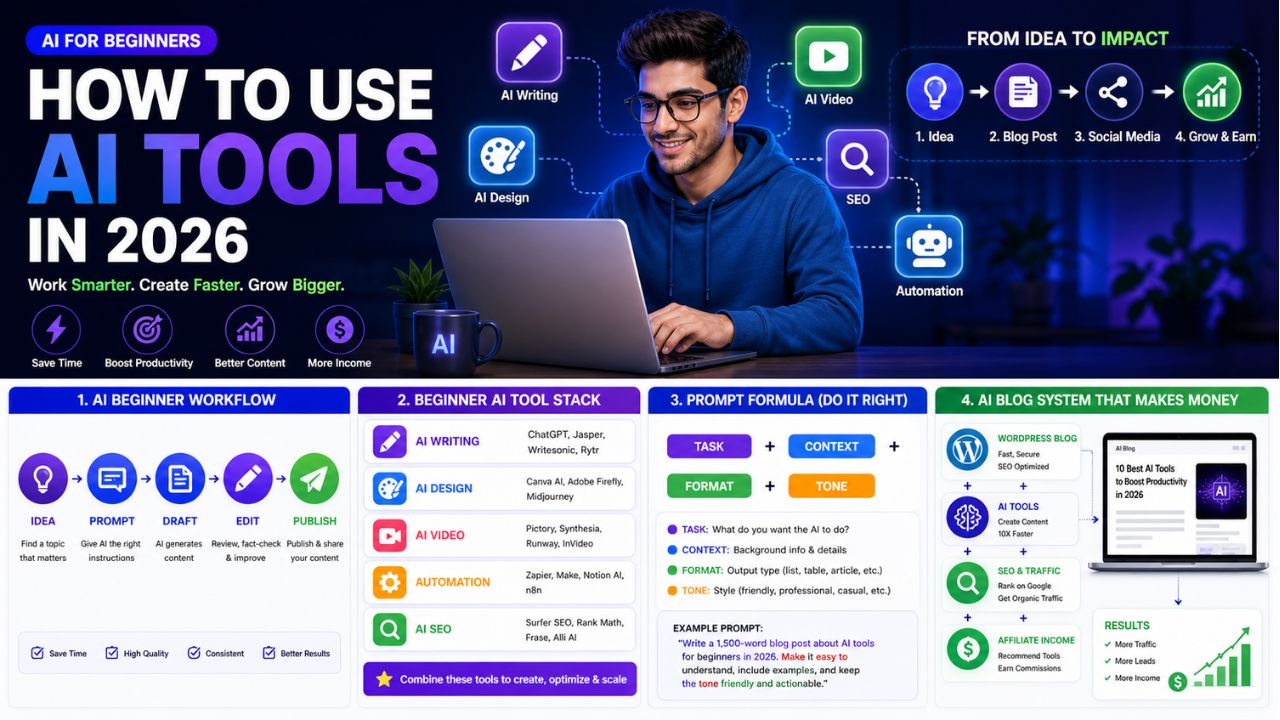
A beginner does not need a giant AI stack on day one. Start with one writing tool and one design tool. Add video, SEO and automation tools only when you have a real workflow that needs them.
| Task | Beginner Tool Type | Example Tools |
|---|---|---|
| Writing and ideas | AI writing assistant | ChatGPT, Claude, Writesonic |
| Blog visuals | AI design tool | Canva AI |
| Video repurposing | AI video tool | InVideo AI, Pictory, Runway, Synthesia |
| Grammar and polish | AI editing tool | Grammarly |
| Automation | Workflow automation tool | Zapier, Make |
| SEO improvement | AI SEO tool | Rank Math, SurferSEO, Frase, NeuronWriter |
Simple rule: one goal, one tool, one workflow.
What Are AI Tools?
AI tools are software applications that use artificial intelligence to help you complete tasks faster, better, or more automatically.
They can help with writing, editing, design, research, data analysis, video creation, audio editing, image generation, customer support, coding and workflow automation.
For beginners, the easiest way to understand AI tools is this:
AI tools take your instruction and produce an output.
Your instruction is called a prompt. The output could be a blog outline, article draft, image idea, video script, email, table, summary, social caption or workflow plan.
For example, you can write:
Write a beginner-friendly blog outline about AI tools for bloggers in 2026.
The AI tool may give you an organized article structure with headings, subheadings and key talking points.
That is the basic pattern. You give direction. AI gives a draft or suggestion. You review, improve and publish the final version.
The most important thing to understand is that AI tools are assistants, not replacements for your judgment. They can speed up the work, but you still need to decide what is accurate, useful and right for your audience.
Common Types of AI Tools Beginners Should Know
Before you learn how to use AI tools, it helps to understand the main categories. You do not need every category right away, but knowing the difference will save you from wasting time and money.
AI Writing Tools
AI writing tools help you create outlines, introductions, blog posts, emails, product descriptions, YouTube scripts, newsletters and social media captions.
For bloggers, this is usually the first category to learn because writing touches almost every online business workflow.
The best use case is turning ideas into structured drafts faster. The real limitation is that AI writing still needs editing, fact-checking, examples and human experience.
AI Design Tools
AI design tools help you create graphics, thumbnails, featured images, social media posts, Pinterest pins, logos and visual templates.
For bloggers, visuals matter because they affect trust, click-through rate and social sharing.
Canva AI is the easiest starting point for many beginners because it combines templates, text, images, and AI features in one simple design workspace.
AI Video Tools
AI video tools help you turn written content into videos, generate captions, edit footage, create voiceovers or produce short clips for social platforms.
For bloggers, this creates a strong repurposing opportunity. One blog post can become a YouTube video, a short Instagram Reel, a TikTok clip, a Pinterest idea pin or a LinkedIn video summary.
Examples include InVideo AI, Pictory, Runway and Synthesia.
AI Automation Tools
AI automation tools connect different apps and make tasks happen automatically.
For example:
New blog post published → create social media task → update Google Sheet → add task to content calendar.
Tools like Zapier and Make are useful because they save time on repetitive work.
If automation is new for you, this guide on what AI automation tools are explains the basics in a simple way.
AI SEO Tools
AI SEO tools help you plan and improve content for search engines.
They can help with keyword research, content briefs, heading suggestions, related terms, internal linking and on-page optimization.
For bloggers, SEO is where AI becomes more valuable because ranking content can generate traffic for months or years.
The limitation is that SEO tools give recommendations, but they cannot replace real expertise, helpful content, original examples and reader trust.
Why Beginners Should Use AI Tools in 2026
AI is no longer optional for online creators.
That does not mean every piece of content should be generated by AI. It means every serious blogger should understand how AI fits into the workflow.
The biggest benefit is speed.
A beginner who used to spend three hours brainstorming blog ideas can now create a draft topic map in minutes. A blogger who struggled with featured images can create a professional-looking design in Canva. A creator who avoided video can turn articles into short video drafts with AI video tools.
But the real benefit is not only speed. The real benefit is consistency.
Most blogs fail because the owner stops publishing. AI tools make it easier to keep going because they reduce friction at every step.
If you can create outlines faster, write first drafts faster, design thumbnails faster and repurpose content faster, your chances of staying consistent improve.
That is where AI becomes valuable for bloggers.
Step 1: Pick One Clear Goal
The first step in learning how to use AI tools is choosing one goal.
This is where most beginners make the first mistake. They start with tools instead of outcomes.
Do not ask, “Which AI tool should I use?”
Ask, “What do I want AI to help me achieve this week?”
Good beginner goals include writing one blog post, creating five Pinterest pins, turning one blog post into a YouTube script, building a list of blog topic ideas, creating a content calendar, improving an old article, automating social sharing, or writing better email subject lines.
Once the goal is clear, the right tool becomes easier to choose.
If your goal is writing a blog post, start with ChatGPT, Claude, or Writesonic. If your goal is creating visuals, start with Canva AI. If your goal is turning articles into videos, start with InVideo AI or Pictory. If your goal is saving time on repetitive tasks, start with Zapier or Make.
Step 2: Start With a Beginner AI Stack
Do not try 15 tools in your first week.
That creates confusion, subscription waste, and half-finished workflows.
Start with a small beginner stack that covers the basics.
Writing: ChatGPT, Claude or Writesonic
Use an AI writing assistant for idea generation, outlines, drafts, FAQs, intros, meta descriptions and social captions.
Create a beginner-friendly blog outline for a 3000-word article about [topic]. Include SEO headings, FAQs and a practical conclusion.
Design: Canva AI
Use Canva AI for blog featured images, Pinterest pins, Instagram posts, YouTube thumbnails, and simple brand graphics.
Create a blog featured image concept for an article titled [title]. Use a clean tech-blog style with AI icons and readable headline text.
Editing: Grammarly
Use Grammarly or another editing tool to improve clarity, grammar and tone before publishing.
A simple workflow is:
Draft with AI → edit manually → polish with Grammarly → publish.
Automation: Zapier or Make
Use automation only after you already have a repeatable task.
A beginner workflow could be:
New WordPress post → add row to Google Sheet → create social media task → notify yourself by email.
Blogging Foundation: WordPress and Hosting
If you want to turn AI tools into a real online business, you need somewhere to publish. A WordPress blog on reliable hosting is still one of the best foundations for SEO and affiliate marketing.
For beginners, Hostinger is a practical starting point because it is WordPress-friendly and easy to set up.
Build Your AI Blog Foundation
If you want to use AI tools for blogging, affiliate reviews, or online income, start with a real WordPress site where your content can rank and convert.
Step 3: Learn Prompting
Prompting is the most important beginner AI skill.
A prompt is simply the instruction you give to an AI tool.
Bad prompts produce weak results. Clear prompts produce useful drafts.
The easiest prompt formula is:
Task + Context + Format + Tone
Here is what that means:
- Task: What do you want the AI to do?
- Context: Who is it for and why?
- Format: What should the output look like?
- Tone: How should it sound?
Bad prompt:
Write about AI tools.
Better prompt:
Write a 300-word beginner-friendly introduction for a blog post about how AI tools help bloggers in 2026. Use simple English, short paragraphs, and a practical tone.
Even better prompt:
Write a 300-word introduction for AI Sage Labs readers. The audience is beginner bloggers and creators who feel overwhelmed by AI tools. Explain the problem, promise a step-by-step solution, and avoid hype.
The better prompt gives the AI a role, audience, purpose, structure, and style. That is why the output will usually be stronger.
Step 4: Create Your First Blog Outline
The safest way to use AI tools for blogging is to begin with outlines.
Do not ask AI to write a full article immediately. Start by asking it to organize your ideas.
Create a detailed SEO outline for a 3000-word blog post titled “How to Use AI Tools in 2026.” The audience is beginner bloggers and creators. Include step-by-step guidance, tool examples, common mistakes, FAQs, and a final checklist.
Then review the outline yourself.
Ask these questions:
- Does this answer the reader’s real problem?
- Are the headings clear?
- Is anything missing?
- Is the order logical?
- Can I add personal examples or tool experience?
This is where human judgment matters. AI can organize quickly, but you decide what belongs in the final post.
If you want tool ideas for your stack, read this guide on trending AI tools in 2026.
Step 5: Turn the Outline Into a Draft
Once you have a strong outline, write section by section.
This is important because long AI outputs often become repetitive, generic, or shallow.
Instead of asking for one long article, use a section-by-section workflow.
Write the section “Step 3: Learn Prompting” for this blog post. Keep it beginner-friendly, practical, and around 350 words. Include one bad prompt, one better prompt, and one improved prompt.
This gives you better control.
After each section, edit manually. Add examples, remove weak sentences, and check accuracy.
AI should help you create a first draft, not replace the editing process.
The best AI-assisted blog posts usually follow this workflow:
Outline → section draft → manual edit → SEO check → final polish → publish.
Step 6: Use AI for Blog Images and Graphics
Images make your blog feel more professional.
For AI blogs, you should create at least one featured image for every post. You can also create simple comparison graphics, workflow diagrams, and Pinterest pins.
Good blog visuals can help with click-through rate, social sharing, brand trust, Pinterest traffic, and reader engagement.
A beginner visual workflow looks like this:
- Write your blog title.
- Ask AI for a featured image concept.
- Create the image in Canva AI or another design tool.
- Add your brand colors and title overlay.
- Compress the image before uploading to WordPress.
You do not need perfect design skills. You need clean, readable visuals that match the article and help the reader understand the topic.
Step 7: Use AI for Video Creation
Video is one of the easiest ways to repurpose blog content in 2026.
If you already wrote a blog post, you have the raw material for a video.
You can ask AI to turn your article into a YouTube script, short video script, list of talking points, voiceover script, storyboard, or social media video caption.
Turn this blog post section into a 60-second YouTube Shorts script. Keep it beginner-friendly, include a strong hook, and end with a simple call to action.
Tools like InVideo AI and Pictory can help turn written content into video drafts with visuals, captions, and voiceover.
This is useful because it helps bloggers reach audiences beyond Google Search.
One article can become several content assets:
- Blog post for SEO
- YouTube video for discovery
- Short clip for Instagram or TikTok
- Pinterest pin for visual traffic
- LinkedIn post for authority
That is how AI tools multiply the value of one piece of content.
Step 8: Automate the Repetitive Parts
Automation is powerful, but beginners should use it carefully.
Do not automate before you understand the task manually. First, repeat the task a few times. Then automate the parts that are boring and predictable.
Good beginner automations include saving new blog post ideas into Google Sheets, creating social media tasks after publishing, tracking affiliate content updates, sending reminders, or organizing lead information.
Example workflow:
New WordPress post published → add post title and URL to Google Sheets → create task to make Pinterest pins → send reminder to create social captions.
This kind of automation does not replace strategy. It removes repetitive admin work.
Need Help With AI Automation?
If you do not want to set up workflows yourself, you can hire help for WordPress, Zapier, Make, AI automation, or content systems.
Step 9: Combine AI Tools Into a Blogging System
The real power of AI tools comes when you combine them into a simple system.
Here is a beginner AI blogging workflow:
- Use ChatGPT, Claude or Writesonic to brainstorm topics.
- Use an SEO tool to choose one target keyword.
- Use AI to create a blog outline.
- Write the draft section by section.
- Edit manually and polish with Grammarly.
- Create a featured image in Canva AI.
- Publish on WordPress.
- Use AI to create social posts from the article.
- Use Zapier or Make to track and distribute the content.
- Update the article after 60 to 90 days based on performance.
This workflow is simple, but it covers the full content cycle.
Most beginners fail because they use AI randomly. They ask for one caption, one outline or one idea, then move on.
A system is different. A system helps you repeat the process every week.
That is how AI tools become useful for blogging and online business.
Best Beginner AI Workflow for Bloggers
If you are not sure where to begin, use this simple workflow for your first few posts.
| Stage | Tool Type | Beginner Action |
|---|---|---|
| Idea | AI writing assistant | Generate 10 topic ideas |
| SEO | Keyword or SEO tool | Pick one target keyword |
| Outline | AI writing assistant | Create article structure |
| Draft | AI writing assistant | Write section by section |
| Edit | Manual editing or Grammarly | Improve clarity and accuracy |
| Visual | Canva AI | Create featured image |
| Publish | WordPress | Add post, links, and images |
| Promote | AI and automation | Create captions and tasks |
| Track | Search Console or spreadsheet | Review performance |
If you are just starting, use this workflow for one post per week. Once it feels easy, increase publishing frequency.
Common Mistakes Beginners Make With AI Tools
Using Too Many Tools
More tools do not automatically mean better results.
Start with one writing tool, one design tool, and one editing tool. Add more only when you feel a real bottleneck.
Copying AI Content Without Editing
AI drafts often sound clear but generic.
Always edit before publishing. Add examples, opinions, screenshots, comparisons, and real experience wherever possible.
Ignoring SEO
AI can write content quickly, but fast content without search intent does not automatically get traffic.
Before writing, understand the keyword, reader problem, and competing pages.
Trusting AI Facts Without Checking
AI can make mistakes. It can also give outdated pricing, wrong feature lists, or invented statistics.
Always verify pricing, tool features, and important claims from official sources before publishing.
Automating Too Early
Automation works best when the workflow is already clear.
If you automate a messy process, you create faster confusion.
How to Use AI Tools for Online Income
AI tools can support online income, but they do not create income by themselves.
This is important.
You do not make money because you opened an AI tool. You make money when AI helps you support a real business model.
For bloggers and affiliate marketers, AI tools can help you create review posts, comparison articles, tutorials, email content, social posts, video scripts, digital product ideas and content updates.
For freelancers, AI tools can help with proposals, client research, service delivery, design drafts, content writing, SEO reports and workflow automation.
For creators, AI tools can help repurpose one idea into multiple formats.
The income comes from the system around the tool: audience, content, offer, trust, traffic and consistency.
Recommended AI Tools to Start With
If you want to test tools without overthinking, start with a small stack.
Try a Simple Beginner AI Stack
Start with one writing tool, one design tool, and one automation tool. Once your workflow is working, add video and SEO tools only when needed.
Recommended Resource Before You Finish
Want a Faster AI Tools Starter Path?
If you feel overwhelmed by too many AI tools, start with a simple checklist instead of buying random subscriptions. Your first goal should be one blog post, one featured image, one social caption and one basic automation.
Access the AI Tools Beginner Starter Checklist
Recommended Book for AI Beginners
If you want to understand the business side of using AI and digital tools, a useful book to explore is Co-Intelligence: Living and Working with AI. It is a helpful read for understanding how AI can fit into real work instead of treating it like a shortcut.
Learn Practical AI Thinking
If you want to understand how to work better with AI tools, this book is a strong next step for bloggers, creators and online business owners.
The Honest Truth About AI Tools for Beginners
AI tools can save time, but they do not remove the need to think.
This is the biggest truth beginners need to understand.
AI can help you write faster. It can suggest ideas. It can create images. It can turn articles into videos. It can automate repetitive tasks.
But it cannot decide your real audience for you. It cannot build trust automatically. It cannot replace personal experience. It cannot guarantee traffic or income just because you publish more content.
The bloggers who win with AI in 2026 are not the ones blindly copy-pasting AI articles.
They are the ones using AI to do more of the right work: better research, better outlines, faster drafts, cleaner visuals, more consistent publishing, smarter repurposing, and stronger updates.
AI is not the business. AI is the productivity layer on top of the business.
If you use it that way, it becomes extremely powerful.
Final Beginner Checklist
Before you start using AI tools seriously, follow this checklist:
- Pick one clear goal.
- Choose one writing tool.
- Choose one design tool.
- Learn the basic prompt formula.
- Create one blog outline.
- Draft one post section by section.
- Edit manually before publishing.
- Create one featured image.
- Publish on WordPress.
- Repurpose the post into social content.
- Track what works.
Do not make the process complicated.
One finished post is more valuable than ten unfinished tool experiments.
Final Words:
Yes, beginners should absolutely learn how to use AI tools in 2026.
AI tools can help you save time, create better content, design visuals, repurpose posts, automate workflows and build a stronger online business foundation.
But the smartest approach is simple: start small.
Pick one goal. Choose one or two tools. Learn prompting. Create your first workflow. Improve it over time.
If your goal is blogging, the best beginner path is:
WordPress blog → AI writing tool → Canva AI → Grammarly → SEO basics → automation later.
That is enough to begin.
Once your workflow is working, you can add advanced tools like SurferSEO, Zapier, Make, Pictory and InVideo AI.
The goal is not to collect AI tools. The goal is to build a system that helps you create useful content consistently.
That is how beginners turn AI from a confusing trend into a practical advantage.
Frequently Asked Questions
Are AI tools free to use?
Many AI tools offer free plans, but advanced features usually require paid plans. Beginners can start with free versions of writing, design and editing tools, then upgrade only when a limitation slows down their workflow.
Do I need coding skills to use AI tools?
No. Most beginner AI tools do not require coding skills. Writing tools, design tools, video tools and automation platforms are built for regular users. Coding knowledge can help with advanced workflows, but it is not required to start.
Which AI tool should I start with?
Start with an AI writing assistant because writing and planning are useful in almost every workflow. After that, add Canva AI for visuals and Grammarly for editing. Bloggers can later add SEO, video and automation tools.
Can AI tools replace human writers?
AI tools can assist writers, but they should not replace human judgment. The best content still needs real experience, editing, examples, fact-checking and a clear understanding of the reader.
Are AI tools good for blogging?
Yes. AI tools are useful for blogging when used properly. They can help with topic ideas, outlines, drafts, editing, images, SEO, social captions and content repurposing. The key is to use AI as an assistant, not as a copy-paste content machine.
How long does it take to learn AI tools?
Basic AI tool usage can be learned in a few days. Building a complete workflow for blogging, design, video and automation may take a few weeks of practice. The fastest way to learn is to use AI on one real project from start to finish.
Can I make money with AI tools?
Yes, but not just by using AI tools randomly. AI tools can help you create content faster, build affiliate blogs, design digital products, automate services and repurpose content. Income comes from a real business model, not the tool itself.
Conclusion
Learning how to use AI tools is one of the most useful skills a beginner can build in 2026.
You do not need to become technical. You do not need to subscribe to every tool. You do not need to automate your entire business in one week.
Start with one problem. Choose one tool. Create one workflow. Finish one real project.
That is how AI becomes useful.
For bloggers, the goal is not to publish more generic content. The goal is to create helpful articles faster, design better visuals, repurpose content smarter, and stay consistent long enough for your work to compound.
Use AI as a helper, not a shortcut. Keep the strategy human. Keep the editing human. Keep the final judgment human.
That is the best way to use AI tools without losing quality, trust, or direction.
How We Checked This Guide
Before updating this guide, we checked Google’s publishing guidance for helpful AI-assisted content and Google’s beginner AI learning resource. This helps keep the article practical, safe, and useful for readers who are learning how to use AI tools for real work.
- Google’s guide on helpful, people-first content
- Google’s guidance on AI-generated content
- Google AI Essentials
Affiliate Disclosure
As an Amazon Associate, I earn from qualifying purchases. Some links in this article are affiliate links, which means I may earn a commission at no extra cost to you if you buy through them. I only recommend tools, books and services that may help beginners build better blogs, create useful content, or grow their online work more effectively.
2 thoughts on “How to Use AI Tools in 2026: 9 Simple Steps for Beginners”