
Zapier is still one of the first names people hear when they start learning automation.
That is not an accident. For years, Zapier has made it possible for non-technical users to connect apps, move data, create reminders, and automate repetitive work without writing code.
But automation in 2026 is not the same as it was a few years ago.
Make.com is more visual. Pabbly Connect is popular with budget users. n8n gives technical users more control. AI agents and automation assistants are changing how workflows are built. Even Zapier itself is evolving with Copilot, Tables, Forms, Interfaces, MCP and AI orchestration features.
So the real question is simple: is Zapier still the easiest automation tool for bloggers?
That is exactly what this Zapier review 2026 will answer. If you are a blogger, affiliate marketer, creator, freelancer or beginner trying to automate online tasks, this guide will help you decide whether Zapier is still worth using for your workflow.
Zapier Review 2026: What Is Zapier?
Zapier is a no-code automation platform that connects different apps and automates workflows between them.
In simple words, Zapier helps your apps talk to each other.
For example, instead of manually copying a new blog post link, adding it to a spreadsheet, creating a social media task and sending yourself a reminder, Zapier can automate parts of that workflow.
Zapier workflows are called Zaps.
A basic Zap usually has:
- Trigger: the event that starts the workflow
- Action: what Zapier does after the trigger
Example:
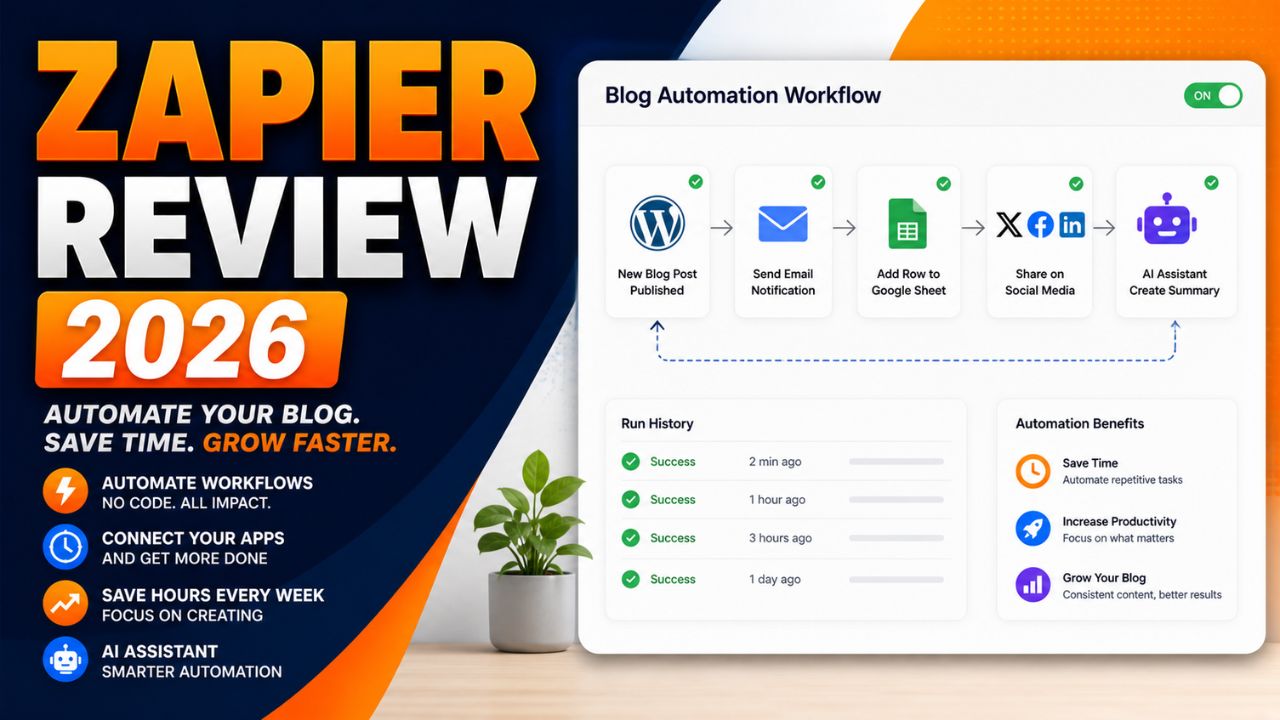
New WordPress post published → add post title and URL to Google Sheets → send email reminder → create social media task.
That is the main reason Zapier has stayed popular. It makes automation easier for people who do not want to code.
Why Zapier Still Matters in 2026
Zapier still matters because it is simple, mature, and widely supported.
Zapier’s official pricing and app pages highlight thousands of integrations, and the platform is now more than simple Zaps. Current Zapier plans include automation tools such as Zaps, Tables and Forms or Interfaces depending on the account and plan page wording. Zapier also highlights AI-focused features such as Copilot and MCP.
For bloggers, this matters because your workflow may include WordPress, Gmail, Google Sheets, ConvertKit, Mailchimp, Notion, Airtable, Slack, social platforms, forms, CRMs, payment tools and AI apps.
The more apps Zapier supports, the easier it is to connect your blogging system.
The other reason Zapier matters is that it is beginner-friendly. Many automation tools are powerful, but not all are easy to understand on day one.
Zapier’s biggest strength is that it makes automation feel approachable.
That is why this Zapier review 2026 focuses on beginner blogging workflows instead of only listing technical automation features.
How Zapier Works
Zapier works through workflows called Zaps.
The basic process looks like this:
- Choose a trigger app.
- Select the event that starts the workflow.
- Choose one or more action apps.
- Map the data from the trigger to the actions.
- Test the workflow.
- Turn the Zap on.
For example, a blogger might create this Zap:
New WordPress post → create a row in Google Sheets → send an email notification → create a Trello task.
This kind of workflow is useful because it keeps blog operations organized without copying and pasting everything manually.
Zapier also includes AI features that can help users build and manage automations. Zapier’s help center describes Zapier Copilot as an AI-powered assistant that works across Zapier products to help users discover automation use cases, build, expand and maintain automation assets.
That makes Zapier more beginner-friendly than before because you can describe what you want in plain language and get help building the workflow.
If you need the broader beginner explanation first, read this guide on what AI automation tools are.
9 Reasons Zapier Is Useful for Bloggers
The main value of this Zapier review 2026 is understanding where Zapier actually helps bloggers.
1. Zapier Is Easy for Beginners
Zapier is one of the easiest automation tools to understand.
You do not need to know APIs, coding, webhooks, or complex automation logic to start. You choose a trigger, choose an action, map the fields, test the Zap and turn it on.
For beginners, that simplicity matters.
If you are new to automation, a tool that feels too technical can stop you before you build anything useful. Zapier reduces that friction.
2. Huge App Integration Library
Zapier’s app ecosystem is one of its biggest advantages.
Bloggers often use many apps. WordPress, Google Sheets, Gmail, ConvertKit, Mailchimp, Notion, Airtable, Slack, Trello, Asana, Typeform and many more tools can become part of a blogging workflow.
The more apps an automation platform supports, the easier it is to build practical workflows without custom development.
3. Zapier Copilot Helps With Automation Ideas
Zapier Copilot is one of the most important AI-related features for beginners.
Zapier describes Copilot as an AI-powered assistant that can help users discover automation use cases and build, expand, or maintain automation assets.
For bloggers, this is useful because many people do not know what to automate first.
You can ask for help turning a blogging process into a workflow, then refine the automation step by step.
Zapier also notes that Copilot is in open beta, so users should review and test everything carefully.
4. Good for Blog Publishing Workflows
Zapier can help organize what happens after a post is published.
For example:
- Save the post title and URL to Google Sheets
- Create a task to design Pinterest pins
- Send a reminder to update social captions
- Notify your team or yourself
- Add the post to a content tracker
These are small tasks, but they repeat every time you publish. Automating them can save time and reduce missed steps.
5. Useful for Email List Automation
Email marketing is important for bloggers and affiliate marketers.
Zapier can help connect forms, email marketing platforms, spreadsheets, CRMs, and notification tools.
For example:
New form submission → add subscriber to email list → tag subscriber by interest → send welcome email → save lead data to Google Sheets.
This kind of automation helps turn blog visitors into email subscribers and organized leads.
6. Helps With Affiliate Tracking
Affiliate bloggers need to track posts, offers, CTAs and update dates.
Zapier can help create a simple tracking system.
For example:
New affiliate review published → add URL, category, affiliate program, and update date to Google Sheets.
This makes it easier to know which posts need updates later.
7. Supports Content Repurposing
Zapier can support content repurposing by connecting your blog with AI tools, social tools, task managers, and spreadsheets.
For example, after publishing a blog post, Zapier can create a task to turn the post into a newsletter, Pinterest pin, LinkedIn post, or short video script.
Depending on your connected tools, AI steps can help draft summaries or captions.
The key is to keep human review. Do not auto-publish AI-generated promotional content without checking it.
8. Scales From Simple to Advanced
Zapier is beginner-friendly, but it can also handle more advanced workflows.
As your blog grows, you may add multi-step Zaps, filters, paths, webhooks, Tables, Forms, Interfaces, and AI features.
This makes Zapier useful because you can start small and grow later.
9. Mature and Reliable Platform
Zapier has been around for years, and many businesses rely on it.
That maturity matters when you want an automation tool for important workflows.
No automation platform is perfect. Zaps can fail if apps change, fields break, or accounts disconnect. But Zapier has documentation, support resources, app coverage, and a large user base.
For beginners, that reliability and support ecosystem can be reassuring.
Zapier Pros and Cons
No Zapier review 2026 should ignore the tradeoffs. Zapier is useful, but it is not perfect.
| Pros | Cons |
|---|---|
| Very beginner-friendly | Can become expensive as task usage grows |
| Huge app integration library | Advanced workflows may be less flexible than Make or n8n |
| Zapier Copilot helps with automation ideas | AI features still need human review and testing |
| Good for blog publishing and email workflows | Task limits can surprise beginners if they automate too much |
| Mature platform with strong documentation | Some workflows may need premium apps or paid plans |
The biggest benefit is ease of use. The biggest limitation is cost as your automation volume grows.
Zapier Pricing in 2026
Pricing is one of the most important parts of any Zapier review 2026 because automation costs depend on usage, not just the plan name.
Zapier pricing can change, so always check the official pricing page before choosing a plan.
Current Zapier pricing pages show a Free plan with 100 tasks per month and paid plans starting with Professional tiers. Zapier also explains that task usage is the main factor when selecting a plan. In Zaps, Zapier Lead Router, and Zapier MCP, usage is measured in tasks.
For beginners, the most important thing is not only the monthly price. It is how many tasks your automations use.
A simple workflow may use only a few tasks. A workflow with many steps, AI actions, filters, and repeated runs can use many more.
Before upgrading, ask:
- How many workflows do I need?
- How often will they run?
- Do I need premium apps?
- Do I need multi-step Zaps?
- Will AI actions increase usage?
- Can I start with a simple workflow first?
Zapier can be worth the cost if it saves real time every week. But beginners should start small and watch task usage carefully.
For this Zapier review 2026, the safest pricing advice is to test one or two simple Zaps first, then upgrade only when automation is clearly saving time.
Try Zapier for Beginner Automation
If you want to automate one simple blogging task, start with a small Zap and test it before building a bigger system.
Is Zapier Beginner-Friendly?
Yes, Zapier is one of the most beginner-friendly automation tools.
That is the main reason it remains popular.
Zapier’s interface is easier to understand than many advanced workflow builders. You do not need to think like a developer to build your first automation.
A beginner can start with something simple:
New blog post published → save post URL to Google Sheets.
Then later add:
Create task → generate social caption → send reminder.
This step-by-step growth is ideal for bloggers who do not want to automate everything at once.
Zapier vs Other Automation Tools
A practical Zapier review 2026 should compare it with the tools bloggers are already hearing about.
Zapier vs Make
Make is more visual and flexible for advanced workflows. It can be better for users who want more control over complex automations.
Zapier is usually easier for beginners and has a very large app ecosystem.
For a full comparison, read this Zapier vs Make.com comparison.
Zapier vs Pabbly Connect
Pabbly Connect is often considered a budget-friendly alternative.
Zapier may feel more polished and beginner-friendly, while Pabbly may appeal to users who are watching costs carefully.
Zapier vs n8n
n8n is more flexible and technical. It can be self-hosted and customized deeply.
Zapier is easier for non-technical users who want a cloud-based automation platform without setup complexity.
Zapier vs AI Agents
AI agents are becoming more popular, but they are not always a direct replacement for Zapier.
Zapier is good for structured, repeatable workflows. AI agents are useful when tasks need more reasoning, planning or flexible decision-making.
In many cases, the best setup may combine both: Zapier for reliable automation and AI tools for drafting, summarizing or decision support.
Make.com
Cursor AI
Perplexity
Best Zapier Workflows for Bloggers
Zapier becomes valuable when you use it for repeated blogging tasks.
WordPress to Google Sheets Tracker
When a new WordPress post is published, Zapier can add the title, URL, date and category to a Google Sheet.
This helps track published content and plan future updates.
New Lead to Email List
When someone fills out a form, Zapier can add them to your email platform and tag them based on the form they used.
Post Published to Task Manager
When a new post goes live, Zapier can create tasks for Pinterest pins, social captions, email promotion and internal linking.
Affiliate Post Update Reminder
Zapier can help create reminders to update affiliate posts after a set period.
AI Caption Drafting
Depending on your tools and plan, Zapier can help connect AI steps that draft short captions or summaries from blog post data.
How Bloggers Can Make Money With Zapier
Zapier does not automatically make money for you, but it can support several income paths.
Affiliate Blogging
Zapier can help track content, organize affiliate posts, automate reminders and support consistent promotion.
More organized promotion can support more traffic and affiliate clicks over time.
Freelance Automation Services
Many creators and small businesses want automation but do not know how to build it.
If you learn Zapier, you can offer workflow setup services such as lead capture, email automation, content tracking and blog promotion systems.
Agency Services
Agencies can use Zapier to build repeatable client workflows for reporting, onboarding, publishing, lead management and content operations.
Digital Products
You can create automation templates, checklists, workflow guides or training products for bloggers who want to save time.
Need Zapier Setup Help?
If you do not want to build Zapier workflows yourself, you can hire freelancers who specialize in automation setup.
Recommended Setup for Blogger Automation
Zapier works best when your blog has a strong foundation.
If your website, email list, content tracker, and publishing workflow are messy, automation will not fix everything. It may only make the mess move faster.
Start with a clean blogging system:
- WordPress blog
- Email platform
- Google Sheets or Airtable tracker
- Task manager
- Social media promotion workflow
- Clear affiliate link tracking
Then connect the pieces with Zapier.
If you are starting a blog or affiliate website, a reliable WordPress setup is still one of the best foundations.
Build an Automation-Ready Blog
Before automating your content workflow, make sure your blog has a reliable WordPress foundation where posts, forms, links, and tracking can work smoothly.
Who Should Use Zapier?
Zapier is best for users who want easy no-code automation.
It is a good fit for:
- Beginner bloggers
- Affiliate marketers
- Creators managing multiple apps
- Small business owners
- Freelancers
- Non-technical users
- Teams that need reliable app connections
If you want the easiest way to start automating your blog, Zapier is still one of the best choices.
Who Should Skip Zapier?
Zapier is not the best fit for every user.
You may want to skip it if:
- You need very complex visual workflows
- You want the lowest possible automation cost
- You are technical and prefer self-hosted automation
- You need deep custom logic and code control
- You are automating high-volume workflows and task costs become too high
In those cases, Make, Pabbly Connect or n8n may be worth comparing.
Recommended Resource Before the Final Words
Want Ready-Made Automation Ideas?
If you are new to automation, start with a simple workflow checklist instead of trying to build a full system in one day. A good starter pack should include blog publishing, email capture, affiliate tracking and social promotion workflows.
Access the Blogger Automation Starter Checklist
Recommended Book for Automation Thinking
If you want to understand how AI and automation fit into modern work, a useful book to explore is Co-Intelligence: Living and Working with AI by Ethan Mollick.
It is not a Zapier tutorial, but it can help you think about AI as a practical work partner. That mindset is useful when building automation because the goal is not to remove thinking. The goal is to remove repeated work.
Recommended Reading
If you are building AI and automation workflows, this book can help you think more clearly about working with AI tools.
Final Verdict: Is Zapier Worth It?
After researching this Zapier review 2026, my honest verdict is that Zapier is still worth it for beginners who want easy automation.
It may not be the cheapest tool. It may not be the most flexible tool for advanced users. But it is one of the easiest ways to connect apps and automate basic workflows without coding.
For bloggers, Zapier is especially useful for publishing workflows, email list automation, content tracking, affiliate reminders and social promotion tasks.
If you are brand new to automation, start with Zapier. If your workflows become more complex later, compare Make or n8n.
The best approach is simple: build one useful Zap, test it, and improve from there.
Start Automating With Zapier
If you want to save time on repeated blog tasks, start with one small Zap and improve it after testing.
Frequently Asked Questions
Is Zapier worth it in 2026?
Yes, Zapier is worth it for beginners and bloggers who want easy no-code automation. It is especially useful for simple app connections, publishing workflows, email list automation, and content tracking.
Is Zapier beginner-friendly?
Yes. Zapier is one of the most beginner-friendly automation platforms because it uses a simple trigger-and-action workflow structure.
Does Zapier require coding?
No. Most Zapier workflows can be built without coding. Advanced users can use more technical features, but coding is not required to start.
How many apps does Zapier support?
Zapier’s app directory includes thousands of integrations. App availability can change, so check Zapier’s app directory for the exact tools you use.
Is Zapier better than Make?
Zapier is usually easier for beginners. Make is often better for visual, advanced, and more flexible workflows. The best choice depends on your automation style.
Can bloggers use Zapier?
Yes. Bloggers can use Zapier to automate content tracking, email workflows, social media tasks, affiliate reminders, form submissions, and publishing systems.
Can I make money using Zapier?
Yes. Zapier can support affiliate blogging, freelancing, agency workflows, and automation services. Income depends on your skill, offer, audience, and execution.
What is Zapier Copilot?
Zapier Copilot is an AI-powered assistant that helps users discover automation use cases and build, expand, or maintain automation assets across Zapier products. It is still in active development, so users should test workflows carefully.
Conclusion
This Zapier review 2026 shows that Zapier is still one of the easiest automation tools for bloggers.
It is not perfect. Costs can rise as task usage grows. Advanced users may prefer Make or n8n. Some workflows may require paid features or premium apps.
But for beginners who want to automate a blog without coding, Zapier remains one of the safest starting points.
If you are tired of manually copying links, updating spreadsheets, creating reminders, and repeating the same blog admin tasks every week, Zapier can help you build a smarter workflow.
Start small. Automate one task. Test it. Then add more steps when the system is working.
That is how bloggers use automation without getting overwhelmed.
How We Checked This Review
Before updating this review, we checked Zapier’s official pricing, help center, app directory, Copilot documentation, and task usage guidance. This helps keep the article accurate, practical, and useful for readers comparing automation tools.
- Zapier pricing
- Zapier app integrations
- Zapier Help: What is Copilot?
- Zapier Help: What is included in the Free plan?
- Zapier Help: How to select your plan
Affiliate Disclosure
As an Amazon Associate, I earn from qualifying purchases. Some links in this article are affiliate links, which means I may earn a commission at no extra cost to you if you buy through them. I only recommend tools, books, and services that may help beginners, creators, and online business owners create better content or grow their work more effectively.