
Choosing web hosting used to feel like a boring technical decision. In 2026, it is a business decision.
If you are building an AI blog, your website is not just a place to publish articles. It is the foundation for affiliate reviews, AI tool comparisons, email capture, ad revenue, digital products, Pinterest traffic, YouTube embeds, comparison tables and long-form SEO content.
That means your hosting affects more than uptime. It affects how fast readers can open your posts, how smoothly your WordPress dashboard works, how safely you can update plugins, how well your pages handle traffic spikes, and how professional your blog feels when someone is deciding whether to trust your recommendation.
The wrong host can make blogging feel slow and frustrating before your content even has a chance to work.
The right host gives you a clean foundation: fast WordPress, easy setup, SSL, backups, migration help, staging, CDN support and enough room to grow without overpaying on day one.
This guide covers the best web hosting for AI blogs in 2026, with a practical focus on bloggers who want to use AI tools to publish better content, rank on Google and build income through affiliate marketing.
Best Web Hosting for AI Blogs in 2026
The best web hosting for AI blogs depends on your stage, budget, and traffic level. A brand-new blogger does not need the same hosting as a profitable AI tool review site with thousands of daily visitors.
For most beginner and growing AI bloggers, Hostinger is the best overall starting point because it combines affordable pricing, beginner-friendly WordPress setup, free SSL, migration support, backups, LiteSpeed performance, CDN on stronger plans and AI website tools.
But Hostinger is not the best choice for everyone.
If you want stronger support, SiteGround is a serious option. If you want a familiar beginner WordPress host, Bluehost is still reasonable. If you want a low-cost alternative, DreamHost is worth considering. If your blog is growing and needs cloud flexibility, Cloudways makes more sense. If your AI blog is already profitable and performance is business-critical, Kinsta or WP Engine may be worth the higher cost.
| Best For | Recommended Host |
|---|---|
| Best overall for beginner AI bloggers | Hostinger |
| Best support-focused WordPress hosting | SiteGround |
| Best familiar beginner WordPress host | Bluehost |
| Best budget alternative | DreamHost |
| Best for growing AI blogs with traffic | Cloudways |
| Best premium managed WordPress hosting | Kinsta |
| Best specialist managed WordPress option | WP Engine |
Recommended for Beginner AI Bloggers
If you want to launch an AI blog without paying premium managed hosting prices, Hostinger is the best starting point for most beginners. It gives you WordPress hosting, free SSL, migration support, backups and AI website tools in one beginner-friendly setup.
Why Hosting Matters for AI Blogs
AI blogging is different from old-school personal blogging.
A simple diary-style blog might only need basic hosting because the pages are light. An AI blog usually becomes heavier very quickly.
A typical AI blog post may include:
- Long-form content around 3000 words
- Tool screenshots
- Comparison tables
- Pros and cons sections
- Affiliate buttons
- FAQ schema
- Email signup forms
- YouTube video embeds
- Pinterest graphics
- Tracking scripts
- Display ads once traffic grows
Each extra element adds weight to the page.
If your hosting is weak, readers may experience slow load times, delayed images, clunky mobile browsing or dashboard issues when you edit posts. That is not just annoying. It can hurt revenue.
Bloggers make money when readers stay, trust the content and click relevant offers. A slow website creates friction at every step.
Hosting also matters because AI makes publishing faster. If you use AI for research, drafts, visuals, editing, and optimization, you may publish more content than a traditional blogger. More publishing means more updates, more images, more plugins and more internal links.
Your hosting has to keep up with that workflow.
If you want the full review of our top pick, read this detailed Hostinger review for AI bloggers.
How We Chose the Best Hosting for AI Bloggers
To choose the best web hosting for AI blogs, we focused on what actually matters to content creators, not just what looks impressive on a pricing table.
This list is not based only on the cheapest advertised price.
Cheap hosting can be useful, but the cheapest plan is not always the best business decision. AI bloggers need a balance of price, speed, support, WordPress features and growth potential.
We looked at:
- WordPress friendliness
- Starting price and renewal reality
- Backup and security features
- CDN and performance tools
- Ease of setup for beginners
- Scaling options
- Support quality and availability
- Fit for affiliate blogs and content sites
- Whether the host makes sense for AI-assisted publishing workflows
The result is a practical list for bloggers, not a technical server benchmark for developers.
1. Hostinger: Best Overall for Beginner AI Bloggers
Hostinger is our top pick for the best web hosting for AI blogs because it gives beginners the strongest balance of price, WordPress features, AI tools and ease of use.
For most new bloggers, this matters more than having the most advanced server configuration. You need a host that helps you get online quickly, keeps your site reasonably fast, gives you backups, includes SSL and does not overwhelm you with technical complexity.
Hostinger does that well.
The Business WordPress plan is usually the sweet spot for AI bloggers because it gives more room than the entry-level plan. Depending on the current plan details, it can include features such as daily backups, CDN, staging, more storage and AI website tools. Hostinger also promotes AI website creation and WordPress AI management features, which fit the AI blogging audience better than many traditional hosts.
For a site publishing AI tool reviews, affiliate comparisons and tutorial posts, Hostinger is enough to start seriously without jumping into expensive managed WordPress hosting.
Best for: beginner bloggers, AI affiliate sites, tool review blogs and creators launching WordPress content sites.
Best plan for AI bloggers: Business WordPress hosting.
Income mechanism: Hostinger helps you launch faster, keep costs low and publish SEO content on a WordPress foundation that can support affiliate monetization.
Real limitation: renewal prices are higher than promotional prices and high-traffic blogs may eventually need stronger cloud or premium managed WordPress hosting.
Start your AI blog with Hostinger
2. SiteGround: Best for Support and Reliable WordPress Performance
SiteGround is one of the best choices if support matters more to you than the lowest possible price.
Many beginner bloggers underestimate support until something goes wrong. A plugin conflict, migration issue, SSL problem or performance warning can stop your workflow for hours. SiteGround has built a strong reputation around WordPress support, performance and reliability.
SiteGround is also a good fit for bloggers who want a cleaner managed WordPress experience without going all the way to premium hosts like Kinsta or WP Engine.
According to SiteGround’s official hosting page, GrowBig is positioned as a strong value plan for growing sites and includes features such as unlimited websites, free SSL, CDN, backups, email, caching and WordPress services. SiteGround also now highlights AI website builder features and an AI Agent for WordPress.
For AI bloggers, SiteGround works well if you are building a serious content site and want more confidence around technical support. It is not always the cheapest long-term option, but the extra support can be worth it if you do not want to troubleshoot every issue yourself.
Best for: bloggers who want dependable WordPress hosting and are willing to pay more than the cheapest budget host.
Best plan for AI bloggers: GrowBig.
Income mechanism: better support and reliable WordPress performance reduce downtime and technical delays, helping you stay focused on publishing and optimizing content.
Real limitation: renewal pricing can feel expensive compared with Hostinger and DreamHost.
3. Bluehost: Best Familiar Beginner-Friendly WordPress Host
Bluehost is one of the most recognized names in beginner WordPress hosting.
It is not the most exciting choice on this list, but it is still a reasonable option for bloggers who want a familiar hosting company, simple WordPress setup, free domain on eligible plans, SSL and support.
Bluehost’s official pricing page currently shows shared web hosting plans starting with Starter and Business tiers, and it clearly separates promotional pricing from renewal pricing. That is important because the real cost of hosting is not only the first discounted term.
For AI bloggers, Bluehost can work well if your priority is getting a WordPress site online without learning technical hosting details. The dashboard is designed for beginners and the company has a long history with WordPress users.
The reason Bluehost is not our top pick is value. Hostinger usually offers a stronger price-to-feature balance for AI bloggers. SiteGround often feels stronger for support. Cloudways is stronger for scaling.
But Bluehost is still a practical beginner option.
Best for: first-time WordPress users who want a familiar host with beginner guidance.
Best plan for AI bloggers: Business-style shared hosting or WordPress hosting, depending on current naming.
Income mechanism: easy WordPress setup helps beginners launch content sites quickly and start publishing affiliate posts.
Real limitation: add-ons and renewal pricing can increase the true cost over time.
4. DreamHost: Best Budget Alternative
DreamHost is a good alternative if you want affordable hosting from a long-running hosting company.
It is not as AI-branded as Hostinger, and it is not as support-forward as SiteGround. But DreamHost can make sense for beginners who want a low-cost WordPress setup, free SSL, daily backups on current plans and enough resources to launch a content site.
DreamHost’s official website currently promotes web and WordPress hosting from low starting prices, free WordPress migrations, and an AI website builder called Remixer. Its newer plan pages also show features like automatic daily backups, free SSL and NVMe SSD storage on some plans.
DreamHost is especially useful for bloggers who are disciplined about keeping the site lightweight. If you use a fast theme, compress images, avoid plugin overload and build clean posts, DreamHost can be enough for a new AI blog.
The important thing is not to confuse cheap with unlimited power. Budget hosting should be treated as a starting point. Once your AI blog has serious traffic and revenue, you may want to upgrade.
Best for: new bloggers who want an affordable alternative to Hostinger and Bluehost.
Best plan for AI bloggers: web hosting plan for beginners or managed WordPress if your budget allows.
Income mechanism: low monthly cost keeps your early blogging expenses under control while you build traffic and affiliate income.
Real limitation: it does not offer the same AI-focused positioning and beginner growth features that make Hostinger stand out for AI bloggers.
5. Cloudways: Best for Growing AI Blogs With More Traffic
Cloudways is different from Hostinger, Bluehost and DreamHost.
Instead of traditional shared hosting, Cloudways gives you managed cloud hosting on providers like DigitalOcean, Vultr, Linode, AWS and Google Cloud. This gives you more performance flexibility and scaling potential, but it also comes with a slightly more technical feel.
Cloudways’ official pricing page currently highlights Flexible and Autonomous hosting options, DigitalOcean plans, Lightning Stack, staging, free SSL, server-level firewall, support and AI Copilot credits on some plans.
For a brand-new blogger, Cloudways may be more than you need. For a growing AI blog with dozens of affiliate posts, traffic spikes, multiple plugins, image-heavy pages and serious revenue potential, Cloudways becomes much more interesting.
The key benefit is control. You can scale server resources as your blog grows instead of immediately moving to expensive premium managed WordPress hosting.
Best for: growing blogs, higher-traffic content sites and bloggers who want more cloud flexibility.
Best plan for AI bloggers: entry-level DigitalOcean plan, then scale as traffic grows.
Income mechanism: better scaling and performance can support higher traffic, more content assets and larger affiliate campaigns.
Real limitation: more technical than Hostinger or Bluehost. Beginners may prefer simpler hosting at first.
6. Kinsta: Best Premium Managed WordPress Hosting
Kinsta is not cheap, but it is one of the strongest premium managed WordPress hosting options.
For most brand-new AI bloggers, Kinsta is overkill. Spending premium hosting money before your site earns income is usually not necessary.
But once your AI blog is generating traffic and revenue, Kinsta becomes easier to justify. You get high-end managed WordPress performance, CDN, security, expert support, staging, migrations, backups and a polished dashboard.
Kinsta’s official pricing pages currently show single-site plans starting around the Single 35k tier, with visits, storage, CDN allowance, free migration and backup retention listed clearly. Pricing can change, so check the live page before buying.
Kinsta is especially attractive if your blog is already a real business. If a slow site costs you affiliate commissions, ad revenue or email subscribers, premium hosting becomes an investment instead of an expense.
This is why Kinsta is best viewed as an upgrade path, not the default starting point.
Best for: profitable AI blogs, agencies, serious publishers, and premium WordPress sites.
Best plan for AI bloggers: single-site plan based on your traffic level.
Income mechanism: premium performance and managed support protect a profitable content business where downtime or slow pages can cost money.
Real limitation: too expensive for most beginner bloggers.
7. WP Engine: Best Specialist Managed WordPress Option
WP Engine is another premium managed WordPress host, similar in audience to Kinsta but with its own ecosystem and developer-friendly workflow.
For AI bloggers, WP Engine makes sense if you care about managed WordPress reliability, staging, developer tools, security, and technical support. It is more expensive than budget hosts, but it gives you a more professional WordPress environment.
WP Engine’s official plans page currently highlights Startup, Professional, Growth and Scale options, along with features like global CDN, managed WordPress updates, threat defense, migration tools and WordPress technical support.
WP Engine is best for bloggers who have moved past the beginner stage. If your site is already getting traffic, you publish often and you want fewer technical distractions, a managed WordPress host can be worth the money.
It is not the host I would recommend to a brand-new AI blogger on a tight budget. But it is a strong option for growing brands and content businesses that want WordPress-specific hosting.
Best for: established bloggers, agencies and creators managing revenue-generating WordPress sites.
Best plan for AI bloggers: Startup for one site, Professional for multiple sites.
Income mechanism: managed WordPress infrastructure gives serious bloggers more stability, performance tools, and confidence while scaling content.
Real limitation: higher monthly cost and more advanced positioning than most beginners need.
Tool Comparison: Which Web Host Fits Your AI Blog?
| Host | Best For | Best Stage | Main Limitation |
|---|---|---|---|
| Hostinger | Beginner AI bloggers | Starting and growing | Renewal price increases |
| SiteGround | Support-focused WordPress users | Growing | Higher renewal cost |
| Bluehost | Familiar beginner hosting | Starting | Add-ons can raise cost |
| DreamHost | Budget alternative | Starting | Less AI-focused |
| Cloudways | Growing traffic sites | Scaling | More technical |
| Kinsta | Premium managed WordPress | Established | Expensive for beginners |
| WP Engine | Specialist managed WordPress | Established | Higher cost |
Which Host Should You Choose?
The easiest way to choose the best web hosting for AI blogs is to match the host to your current stage.
If you are starting your first AI blog, choose Hostinger.
It gives you the best balance of price, WordPress features, AI-friendly tools, and beginner simplicity. You can start publishing without spending too much upfront, then upgrade later when the blog earns money.
If you want better support and do not mind paying more, choose SiteGround.
If you want a familiar beginner WordPress host, choose Bluehost.
If budget is the main issue and you want a simple alternative, choose DreamHost.
If your blog is growing and basic shared hosting feels limiting, choose Cloudways.
If your AI blog is already profitable and performance is business-critical, choose Kinsta or WP Engine.
The mistake beginners make is buying hosting for the blog they dream of having three years from now. You should buy hosting for the stage you are actually in, while making sure you have an upgrade path.
For most AI Sage Labs readers, the smartest path is simple: start with Hostinger Business WordPress hosting, publish consistently, build traffic, earn affiliate income, and upgrade later only when the site needs more power.
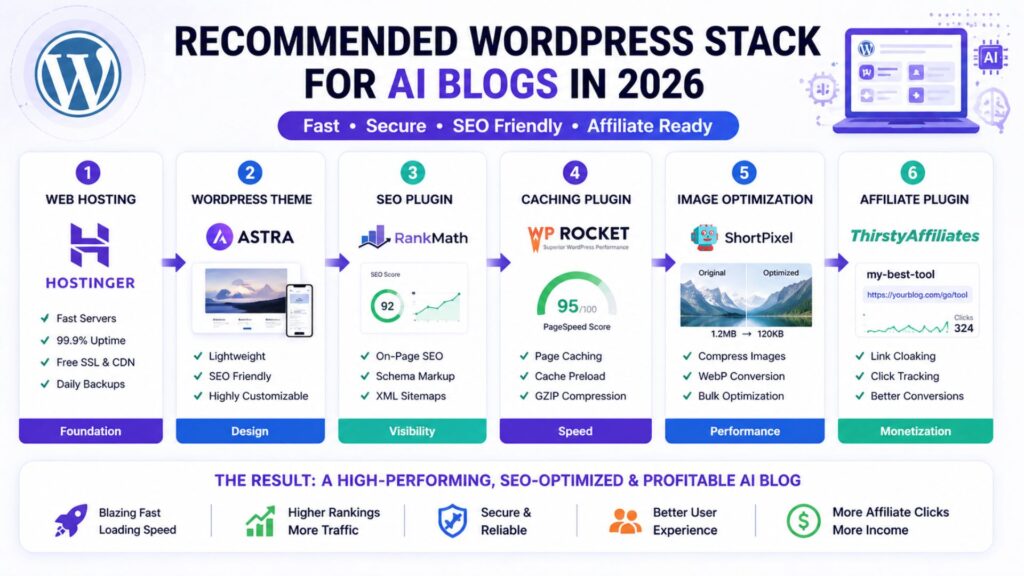
Recommended AI Blog Hosting Stack
Finding the best web hosting for AI blogs is only the first step. Hosting is the foundation, but it is not the whole website.
For a beginner AI blog in 2026, this is the stack I would recommend:
- Hosting: Hostinger Business WordPress hosting
- CMS: WordPress
- Theme: GeneratePress, Kadence or Astra
- SEO plugin: Rank Math or Yoast SEO
- Caching: LiteSpeed Cache or host-level caching
- Image compression: ShortPixel, Imagify or WebP conversion
- CDN: Hostinger CDN, Cloudflare, or host-provided CDN
- Affiliate links: Pretty Links or ThirstyAffiliates
- Email capture: MailerLite, ConvertKit, or Hostinger Reach
- Content writing: ChatGPT, Claude or Writesonic
- Editing: Grammarly
- Visuals: Canva AI
- Analytics: Google Search Console and Google Analytics
This setup is practical because it covers the full AI blogging workflow: research the topic, write the draft, optimize for search, create visuals, publish on WordPress, capture emails, track affiliate links and improve old posts over time.
You do not need every premium tool on day one. Start lean, then upgrade when a tool solves a real bottleneck.
If your goal is to turn the site into income, read this guide on how to make money with AI.
The Honest Truth About Web Hosting and AI Blog Income
No hosting company will make your blog profitable by itself.
That is important to say because hosting affiliate marketing can sometimes make beginners think the host is the magic part.
It is not.
Hosting is the foundation. Content strategy is the engine.
Your blog makes money when you publish helpful content that targets real search intent, solves reader problems, recommends useful tools, and builds trust over time. Hosting supports that process by keeping the site fast, secure and online.
The best AI bloggers in 2026 are not just buying tools and hoping income appears. They are building systems.
They use AI to speed up research, drafts, editing, visuals and repurposing. They use WordPress to publish structured content. They use SEO to attract readers. They use affiliate links and email lists to monetize attention.
Hosting is where all of that lives.
So choose a host that matches your stage. Do not overpay before you have traffic. Do not stay on weak hosting after your site becomes a business.
For most beginners, Hostinger is the right starting point. For growing blogs, Cloudways becomes attractive. For profitable sites, Kinsta and WP Engine become easier to justify.
That is the practical answer.
Start Your AI Blog Right
Before AI tools can help you build income, you need a fast WordPress blog where your content can rank, convert, and grow. Hostinger is our top pick for beginner AI bloggers because it keeps setup simple and costs low while still giving you serious WordPress features.
Need Help Setting Up Your Blog?
If you do not want to handle theme setup, speed optimization, affiliate plugins or blog layout yourself, hiring help can save time.
This is especially useful if you are trying to publish consistently while also learning WordPress, SEO, affiliate marketing and AI tools.
Hire a WordPress Expert on Fiverr
A freelancer can help with WordPress setup, theme design, speed optimization, affiliate plugin setup and blog formatting so you can focus on content.
Recommended Book for AI Bloggers
Hosting gives your blog a foundation, but AI blogging still requires better thinking about tools, work and content systems.
A useful book for that is Co-Intelligence: Living and Working with AI by Ethan Mollick. It is not a hosting book, but it can help bloggers and creators understand how to work with AI more thoughtfully.
Recommended Reading
If you want to build a smarter AI workflow around your blog, this book is a useful next step.
Frequently Asked Questions
What is the best web hosting for AI blogs in 2026?
Hostinger is the best web hosting for AI blogs for most beginners in 2026 because it offers affordable WordPress hosting, beginner-friendly setup, free SSL, migration support, backups, performance features and AI website tools.
Is Hostinger good for AI bloggers?
Yes. Hostinger is a strong fit for AI bloggers because it is affordable, easy to use, and WordPress-friendly. The Business WordPress plan is especially useful because it gives bloggers more room to grow, plus features like backups, staging, CDN and AI tools depending on current plan details.
Do AI blogs need special hosting?
AI blogs do not need a special type of hosting, but they do need good WordPress performance. AI blogs often publish long-form posts, images, comparison tables, affiliate boxes and video embeds. That means fast hosting, caching, image optimization and backups are important.
Can I start an AI blog on cheap hosting?
Yes, you can start an AI blog on cheap hosting if the host is reliable and WordPress-friendly. Hostinger, DreamHost, and Bluehost can all work for beginners. The key is to keep your site lightweight, compress images, avoid too many plugins and upgrade once traffic grows.
When should I upgrade from Hostinger to Cloudways or Kinsta?
Upgrade when your blog has consistent traffic, earns enough revenue to justify the cost, or starts feeling limited by basic hosting. If your site is slow despite optimization, your dashboard struggles during updates or traffic spikes affect performance, it may be time to consider Cloudways, Kinsta or WP Engine.
Is Bluehost better than Hostinger for AI blogs?
For most AI bloggers, Hostinger offers better value because of its low starting pricing, WordPress features and AI-friendly tools. Bluehost is still a good beginner option, especially for users who want a familiar WordPress hosting brand, but Hostinger is our stronger recommendation for AI-focused affiliate blogs.
Is managed WordPress hosting worth it for bloggers?
Managed WordPress hosting is worth it when your blog is serious enough that performance, support and reliability directly affect income. Beginners can usually start with affordable WordPress hosting. Established blogs may benefit from premium managed hosts like Kinsta or WP Engine.
Conclusion
The best web hosting for AI blogs is the one that matches your current stage and gives you room to grow.
For most beginners, that means Hostinger. It is affordable, WordPress-friendly, AI-aware, and practical for launching an AI tool review or affiliate blog without overspending.
If you want more support, SiteGround is excellent. If you want a familiar beginner host, Bluehost can work. If budget matters most, DreamHost is a reasonable alternative. If your blog is growing fast, Cloudways gives more flexibility. If your blog is already profitable, Kinsta and WP Engine are strong premium options.
Do not overcomplicate the decision. Start with hosting that fits your stage, publish useful content consistently, keep your WordPress setup clean and upgrade when the blog earns or demands more.
That is how hosting supports a real AI blogging business.
Sources Used For Research:
- Hostinger WordPress Hosting
- SiteGround Web Hosting
- Bluehost Pricing
- DreamHost Hosting
- Cloudways Pricing
- Kinsta Pricing
- WP Engine Plans
Affiliate Disclosure
As an Amazon Associate, I earn from qualifying purchases. Some links in this article are affiliate links, which means I may earn a commission at no extra cost to you if you buy through them. I only recommend tools, books, and services that may help beginners build better blogs, improve their affiliate content, or grow their online work more effectively.
1 thought on “Best Web Hosting for AI Blogs in 2026: 7 Fast Hosts for Bloggers Using AI Tools”